# Text Fragments


# 1. Text Fragments: Overview

The Text section in Wifox Business Content Solution is designed to manage textual content that is used across different parts of a website or platform. It acts as a repository for reusable text elements such as descriptions, headings, FAQs, and informational blurbs. This centralized structure ensures that text is consistent, easily accessible, and modifiable when necessary.

Each text entry is defined by a Label, a Title, and its associated Content. These texts can be quickly edited, duplicated, or deleted, providing a streamlined workflow for managing website copy.

The following actions are available in the Desks module:

- [Adding](https://wiki.wi.services/books/wifox-content-solution-wcs/page/4-how-to-add-a-new-text-entry)
- [Editing](https://wiki.wi.services/books/wifox-content-solution-wcs/page/5-how-to-edit-a-text-entry)
- [Deletion](https://wiki.wi.services/books/wifox-content-solution-wcs/page/6-how-to-delete-a-text-entry)

# 2. Key Features

<span style="font-size: 14pt; font-family: Arial, sans-serif; color: rgb(161, 163, 165); background-color: transparent; font-weight: bold; font-style: normal; font-variant: normal; text-decoration: none; vertical-align: baseline; white-space: pre-wrap;">Key Features of the Text Section</span>

- <span style="color: rgb(161, 163, 165);"><span style="font-size: 12pt; font-family: Arial, sans-serif; background-color: transparent; font-weight: bold; font-style: normal; font-variant: normal; text-decoration: none; vertical-align: baseline; white-space: pre-wrap;">Labels</span><span style="font-size: 12pt; font-family: Arial, sans-serif; background-color: transparent; font-weight: 400; font-style: normal; font-variant: normal; text-decoration: none; vertical-align: baseline; white-space: pre-wrap;">: Unique identifiers for each text entry, making it easy to locate and reference specific content. </span></span>

<span style="font-size: 12pt; font-family: Arial, sans-serif; color: rgb(161, 163, 165); background-color: transparent; font-weight: 400; font-style: normal; font-variant: normal; text-decoration: none; vertical-align: baseline; white-space: pre-wrap;"><span style="border: none; display: inline-block; overflow: hidden; width: 643px; height: 195px;">![Зображення, що містить текст, знімок екрана, Шрифт, ряд

Автоматично згенерований опис](https://lh7-rt.googleusercontent.com/docsz/AD_4nXfDHPXmUgrBpUEhGzXEJRgDUPYvPoZ-A0Jd9xfzRK8bx5tIPOftGtuoCM1MMJIZw3PVVm_F4ponz5Ue4180fS1pws0lfJBB87N1nnd7WNhOXbwnDRST1kO9kh8ixlvtUzb0lHe4?key=0gy6H2urLwUKcuJX_5Q8Ycab)</span></span>

- <span style="color: rgb(161, 163, 165);"><span style="font-size: 12pt; font-family: Arial, sans-serif; background-color: transparent; font-weight: bold; font-style: normal; font-variant: normal; text-decoration: none; vertical-align: baseline; white-space: pre-wrap;">Titles</span><span style="font-size: 12pt; font-family: Arial, sans-serif; background-color: transparent; font-weight: 400; font-style: normal; font-variant: normal; text-decoration: none; vertical-align: baseline; white-space: pre-wrap;">: Descriptive names for the text entries, providing a clear overview of their purpose or content. </span></span>

<span style="font-size: 12pt; font-family: Arial, sans-serif; color: rgb(161, 163, 165); background-color: transparent; font-weight: 400; font-style: normal; font-variant: normal; text-decoration: none; vertical-align: baseline; white-space: pre-wrap;"><span style="border: none; display: inline-block; overflow: hidden; width: 643px; height: 176px;">![Зображення, що містить текст, Шрифт, ряд, знімок екрана

Автоматично згенерований опис](https://lh7-rt.googleusercontent.com/docsz/AD_4nXcpmTbwzZLPM3vanWM3JAXL0ZhX1k046JgimaWgHsS9dNG54MmHQLRlgQ0wW6udJM8_c2rpulYvt-ocFhltY5fX56pG-IZkdg0GZNStw0iK1kIwFRXcwcV74WgxMMp78TNIgEQdhA?key=0gy6H2urLwUKcuJX_5Q8Ycab)</span></span>

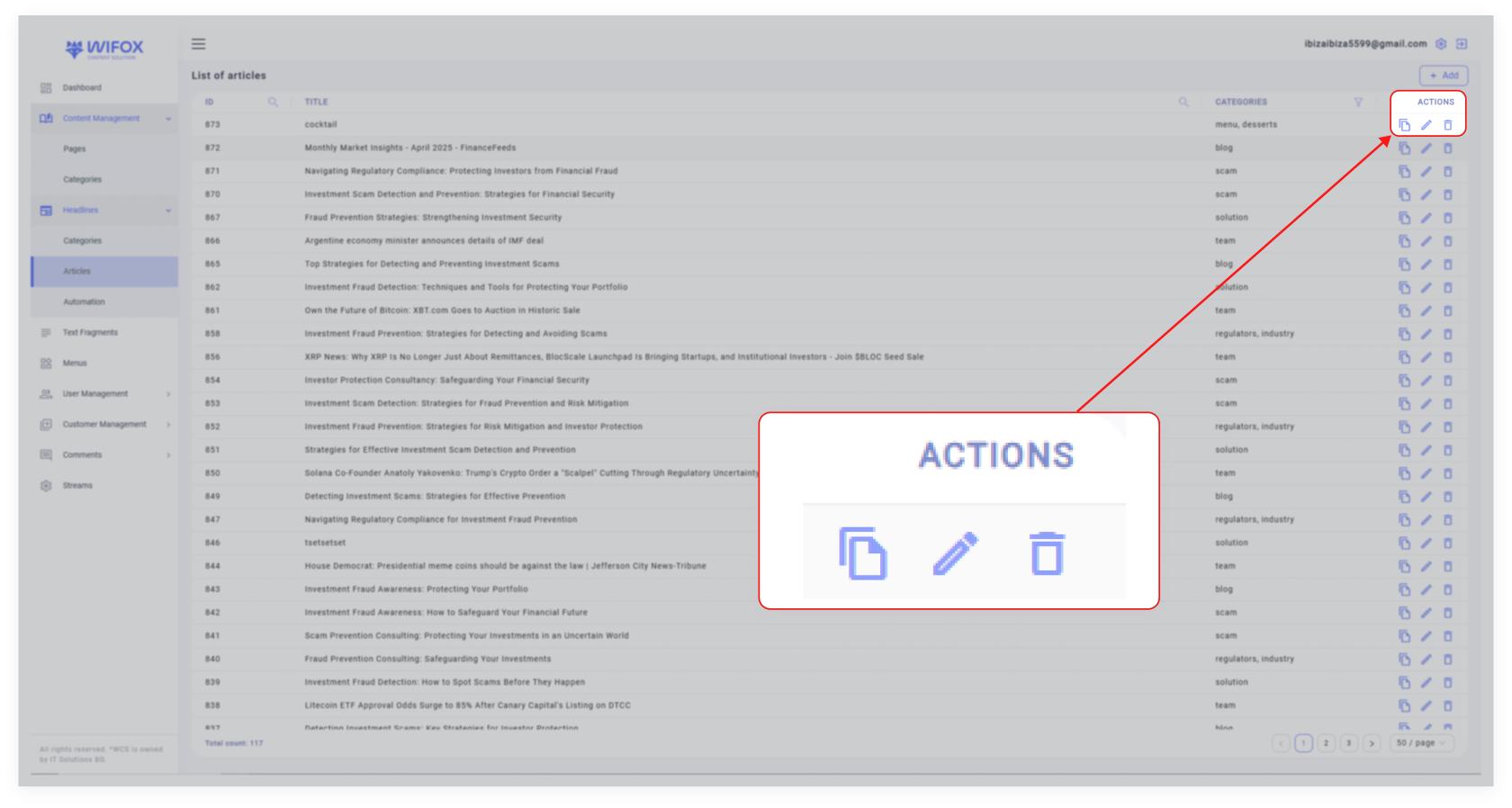
- <span style="color: rgb(161, 163, 165);"><span style="font-size: 12pt; font-family: Arial, sans-serif; background-color: transparent; font-weight: bold; font-style: normal; font-variant: normal; text-decoration: none; vertical-align: baseline; white-space: pre-wrap;">Actions</span><span style="font-size: 12pt; font-family: Arial, sans-serif; background-color: transparent; font-weight: 400; font-style: normal; font-variant: normal; text-decoration: none; vertical-align: baseline; white-space: pre-wrap;">:</span></span>

[![10,01 (16).jpg](https://wiki.wi.services/uploads/images/gallery/2025-04/scaled-1680-/Ofr1001-16.jpg)](https://wiki.wi.services/uploads/images/gallery/2025-04/Ofr1001-16.jpg)

<span style="color: rgb(161, 163, 165);"><span style="font-size: 12pt; font-family: Arial, sans-serif; background-color: transparent; font-weight: 400; font-style: normal; font-variant: normal; text-decoration: none; vertical-align: baseline; white-space: pre-wrap;">  
</span><span style="font-size: 12pt; font-family: Arial, sans-serif; background-color: transparent; font-weight: 400; font-style: normal; font-variant: normal; text-decoration: none; vertical-align: baseline; white-space: pre-wrap;">Each text entry has three actions associated with it:</span></span>

- <span style="color: rgb(161, 163, 165);"><span style="font-size: 12pt; font-family: Arial, sans-serif; background-color: transparent; font-weight: bold; font-style: normal; font-variant: normal; text-decoration: none; vertical-align: baseline; white-space: pre-wrap;">Copy</span><span style="font-size: 12pt; font-family: Arial, sans-serif; background-color: transparent; font-weight: 400; font-style: normal; font-variant: normal; text-decoration: none; vertical-align: baseline; white-space: pre-wrap;">: Duplicate the text entry for creating similar content.</span></span>
- <span style="color: rgb(161, 163, 165);"><span style="font-size: 12pt; font-family: Arial, sans-serif; background-color: transparent; font-weight: bold; font-style: normal; font-variant: normal; text-decoration: none; vertical-align: baseline; white-space: pre-wrap;">Edit</span><span style="font-size: 12pt; font-family: Arial, sans-serif; background-color: transparent; font-weight: 400; font-style: normal; font-variant: normal; text-decoration: none; vertical-align: baseline; white-space: pre-wrap;">: Modify the content of the text entry.</span></span>
- <span style="color: rgb(161, 163, 165);"><span style="font-size: 12pt; font-family: Arial, sans-serif; background-color: transparent; font-weight: bold; font-style: normal; font-variant: normal; text-decoration: none; vertical-align: baseline; white-space: pre-wrap;">Delete</span><span style="font-size: 12pt; font-family: Arial, sans-serif; background-color: transparent; font-weight: 400; font-style: normal; font-variant: normal; text-decoration: none; vertical-align: baseline; white-space: pre-wrap;">: Remove the text entry permanently.</span></span>

# 3. Use Cases

##### **Use Case #1: Consistent Website Messaging**

The Text section can store and manage content used on multiple pages, ensuring uniform messaging across the website. For example, a company overview or tagline can be stored here and used on the homepage, about page, and landing pages.

##### **Use Case #2: Quick Content Updates**

Instead of manually updating text in multiple places, changes can be made directly in the Text section, and those updates will reflect wherever the text is used. For instance, if the "Overview of Financial Commission's Compensation Fund" description changes, the updated text is automatically applied across all relevant pages.

<span id="bkmrk--6"></span>

##### **Use Case #3: FAQ Management**

Store FAQ entries as individual text items. This approach makes it easy to add, edit, or remove frequently asked questions without navigating through page content.

# 4. How to Add a New Text Entry

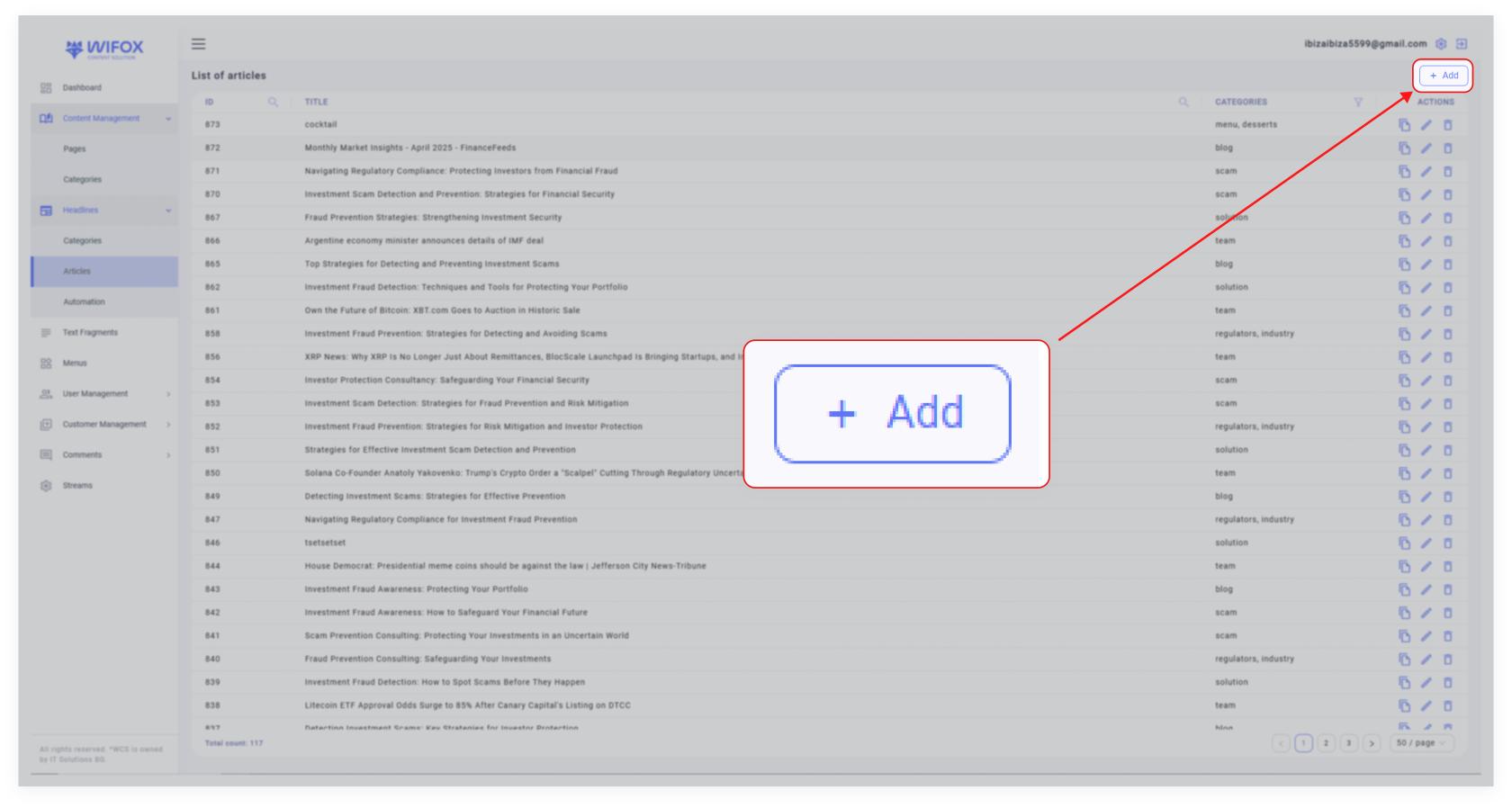
<span style="color: rgb(161, 163, 165);"><span style="font-size: 12pt; font-family: Arial, sans-serif; background-color: transparent; font-weight: bold; font-style: normal; font-variant: normal; text-decoration: none; vertical-align: baseline; white-space: pre-wrap;">1. Click the Add Button</span><span style="font-size: 12pt; font-family: Arial, sans-serif; background-color: transparent; font-weight: 400; font-style: normal; font-variant: normal; text-decoration: none; vertical-align: baseline; white-space: pre-wrap;">: In the top-right corner of the Text section, click the </span><span style="font-size: 12pt; font-family: Arial, sans-serif; background-color: transparent; font-weight: bold; font-style: normal; font-variant: normal; text-decoration: none; vertical-align: baseline; white-space: pre-wrap;">"Add"</span><span style="font-size: 12pt; font-family: Arial, sans-serif; background-color: transparent; font-weight: 400; font-style: normal; font-variant: normal; text-decoration: none; vertical-align: baseline; white-space: pre-wrap;"> button.</span></span>

[![10,01 (13).jpg](https://wiki.wi.services/uploads/images/gallery/2025-04/scaled-1680-/xud1001-13.jpg)](https://wiki.wi.services/uploads/images/gallery/2025-04/xud1001-13.jpg)

<span id="bkmrk--2" style="font-weight: normal; color: rgb(161, 163, 165);"></span>

<span style="color: rgb(161, 163, 165);"><span style="font-size: 12pt; font-family: Arial, sans-serif; background-color: transparent; font-weight: bold; font-style: normal; font-variant: normal; text-decoration: none; vertical-align: baseline; white-space: pre-wrap;">2. Fill in the Details</span><span style="font-size: 12pt; font-family: Arial, sans-serif; background-color: transparent; font-weight: 400; font-style: normal; font-variant: normal; text-decoration: none; vertical-align: baseline; white-space: pre-wrap;">:</span></span>

- <span style="color: rgb(161, 163, 165);"><span style="font-size: 12pt; font-family: Arial, sans-serif; background-color: transparent; font-weight: bold; font-style: normal; font-variant: normal; text-decoration: none; vertical-align: baseline; white-space: pre-wrap;">Label</span><span style="font-size: 12pt; font-family: Arial, sans-serif; background-color: transparent; font-weight: 400; font-style: normal; font-variant: normal; text-decoration: none; vertical-align: baseline; white-space: pre-wrap;">: Enter a unique identifier for the text entry (e.g., "home-cta" for a call-to-action).</span></span>
- <span style="color: rgb(161, 163, 165);"><span style="font-size: 12pt; font-family: Arial, sans-serif; background-color: transparent; font-weight: bold; font-style: normal; font-variant: normal; text-decoration: none; vertical-align: baseline; white-space: pre-wrap;">Title</span><span style="font-size: 12pt; font-family: Arial, sans-serif; background-color: transparent; font-weight: 400; font-style: normal; font-variant: normal; text-decoration: none; vertical-align: baseline; white-space: pre-wrap;">: Provide a clear title describing the text (e.g., "Secure Your Investments with a Licensed Broker!").</span></span>
- <span style="color: rgb(161, 163, 165);"><span style="font-size: 12pt; font-family: Arial, sans-serif; background-color: transparent; font-weight: bold; font-style: normal; font-variant: normal; text-decoration: none; vertical-align: baseline; white-space: pre-wrap;">Content</span><span style="font-size: 12pt; font-family: Arial, sans-serif; background-color: transparent; font-weight: 400; font-style: normal; font-variant: normal; text-decoration: none; vertical-align: baseline; white-space: pre-wrap;">: Write the actual text that will be displayed on the website.</span></span>

<span style="color: rgb(161, 163, 165);"><span style="font-size: 12pt; font-family: Arial, sans-serif; background-color: transparent; font-weight: bold; font-style: normal; font-variant: normal; text-decoration: none; vertical-align: baseline; white-space: pre-wrap;">3. Save</span><span style="font-size: 12pt; font-family: Arial, sans-serif; background-color: transparent; font-weight: 400; font-style: normal; font-variant: normal; text-decoration: none; vertical-align: baseline; white-space: pre-wrap;">: Click </span><span style="font-size: 12pt; font-family: Arial, sans-serif; background-color: transparent; font-weight: bold; font-style: normal; font-variant: normal; text-decoration: none; vertical-align: baseline; white-space: pre-wrap;">Submit</span><span style="font-size: 12pt; font-family: Arial, sans-serif; background-color: transparent; font-weight: 400; font-style: normal; font-variant: normal; text-decoration: none; vertical-align: baseline; white-space: pre-wrap;"> to add the new text entry to the repository.</span></span>

# 5. How to Edit a Text Entry

[![10,01 (11).jpg](https://wiki.wi.services/uploads/images/gallery/2025-04/scaled-1680-/GtQ1001-11.jpg)](https://wiki.wi.services/uploads/images/gallery/2025-04/GtQ1001-11.jpg)

<span id="bkmrk--2" style="font-weight: normal; color: rgb(161, 163, 165);"></span>

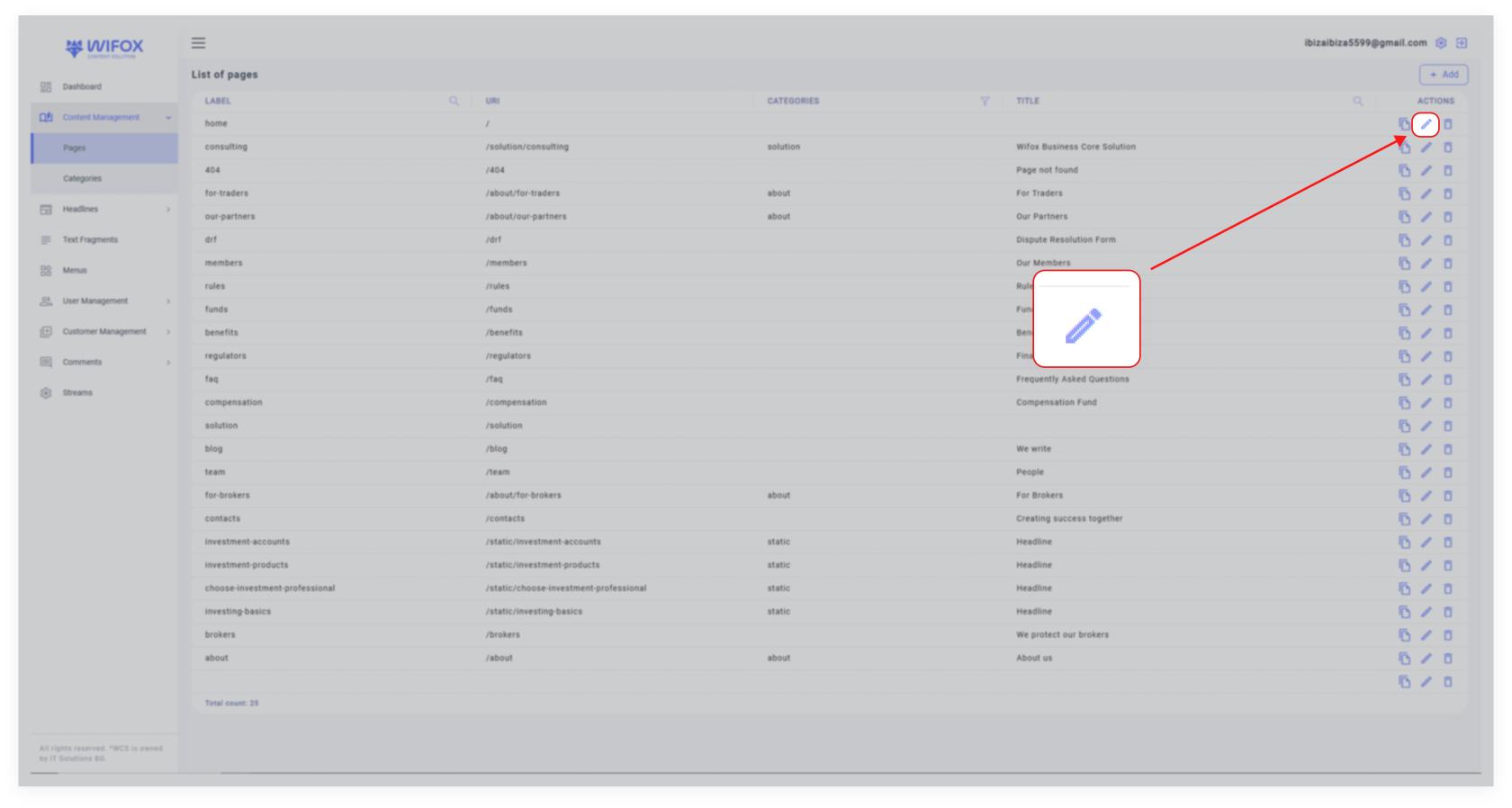
<span style="font-size: 12pt; font-family: Arial, sans-serif; color: rgb(161, 163, 165); background-color: transparent; font-weight: 400; font-style: normal; font-variant: normal; text-decoration: none; vertical-align: baseline; white-space: pre-wrap;">1. Locate the text entry in the list view.</span>

<span style="color: rgb(161, 163, 165);"><span style="font-size: 12pt; font-family: Arial, sans-serif; background-color: transparent; font-weight: 400; font-style: normal; font-variant: normal; text-decoration: none; vertical-align: baseline; white-space: pre-wrap;">2. Click the </span><span style="font-size: 12pt; font-family: Arial, sans-serif; background-color: transparent; font-weight: bold; font-style: normal; font-variant: normal; text-decoration: none; vertical-align: baseline; white-space: pre-wrap;">Edit Icon</span><span style="font-size: 12pt; font-family: Arial, sans-serif; background-color: transparent; font-weight: 400; font-style: normal; font-variant: normal; text-decoration: none; vertical-align: baseline; white-space: pre-wrap;"> next to the desired entry.</span></span>

<span style="color: rgb(161, 163, 165);"><span style="font-size: 12pt; font-family: Arial, sans-serif; background-color: transparent; font-weight: 400; font-style: normal; font-variant: normal; text-decoration: none; vertical-align: baseline; white-space: pre-wrap;">3. Modify the </span><span style="font-size: 12pt; font-family: Arial, sans-serif; background-color: transparent; font-weight: bold; font-style: normal; font-variant: normal; text-decoration: none; vertical-align: baseline; white-space: pre-wrap;">Label</span><span style="font-size: 12pt; font-family: Arial, sans-serif; background-color: transparent; font-weight: 400; font-style: normal; font-variant: normal; text-decoration: none; vertical-align: baseline; white-space: pre-wrap;">, </span><span style="font-size: 12pt; font-family: Arial, sans-serif; background-color: transparent; font-weight: bold; font-style: normal; font-variant: normal; text-decoration: none; vertical-align: baseline; white-space: pre-wrap;">Title</span><span style="font-size: 12pt; font-family: Arial, sans-serif; background-color: transparent; font-weight: 400; font-style: normal; font-variant: normal; text-decoration: none; vertical-align: baseline; white-space: pre-wrap;">, or </span><span style="font-size: 12pt; font-family: Arial, sans-serif; background-color: transparent; font-weight: bold; font-style: normal; font-variant: normal; text-decoration: none; vertical-align: baseline; white-space: pre-wrap;">Content</span><span style="font-size: 12pt; font-family: Arial, sans-serif; background-color: transparent; font-weight: 400; font-style: normal; font-variant: normal; text-decoration: none; vertical-align: baseline; white-space: pre-wrap;"> as needed.</span></span>

<span style="color: rgb(161, 163, 165);"><span style="font-size: 12pt; font-family: Arial, sans-serif; background-color: transparent; font-weight: 400; font-style: normal; font-variant: normal; text-decoration: none; vertical-align: baseline; white-space: pre-wrap;">4. Click </span><span style="font-size: 12pt; font-family: Arial, sans-serif; background-color: transparent; font-weight: bold; font-style: normal; font-variant: normal; text-decoration: none; vertical-align: baseline; white-space: pre-wrap;">Save</span><span style="font-size: 12pt; font-family: Arial, sans-serif; background-color: transparent; font-weight: 400; font-style: normal; font-variant: normal; text-decoration: none; vertical-align: baseline; white-space: pre-wrap;"> to apply the changes.</span></span>

# 6. How to Delete a Text Entry

[![10,01 (12).jpg](https://wiki.wi.services/uploads/images/gallery/2025-04/scaled-1680-/x071001-12.jpg)](https://wiki.wi.services/uploads/images/gallery/2025-04/x071001-12.jpg)

<span id="bkmrk--2" style="font-weight: normal; color: rgb(161, 163, 165);"></span>

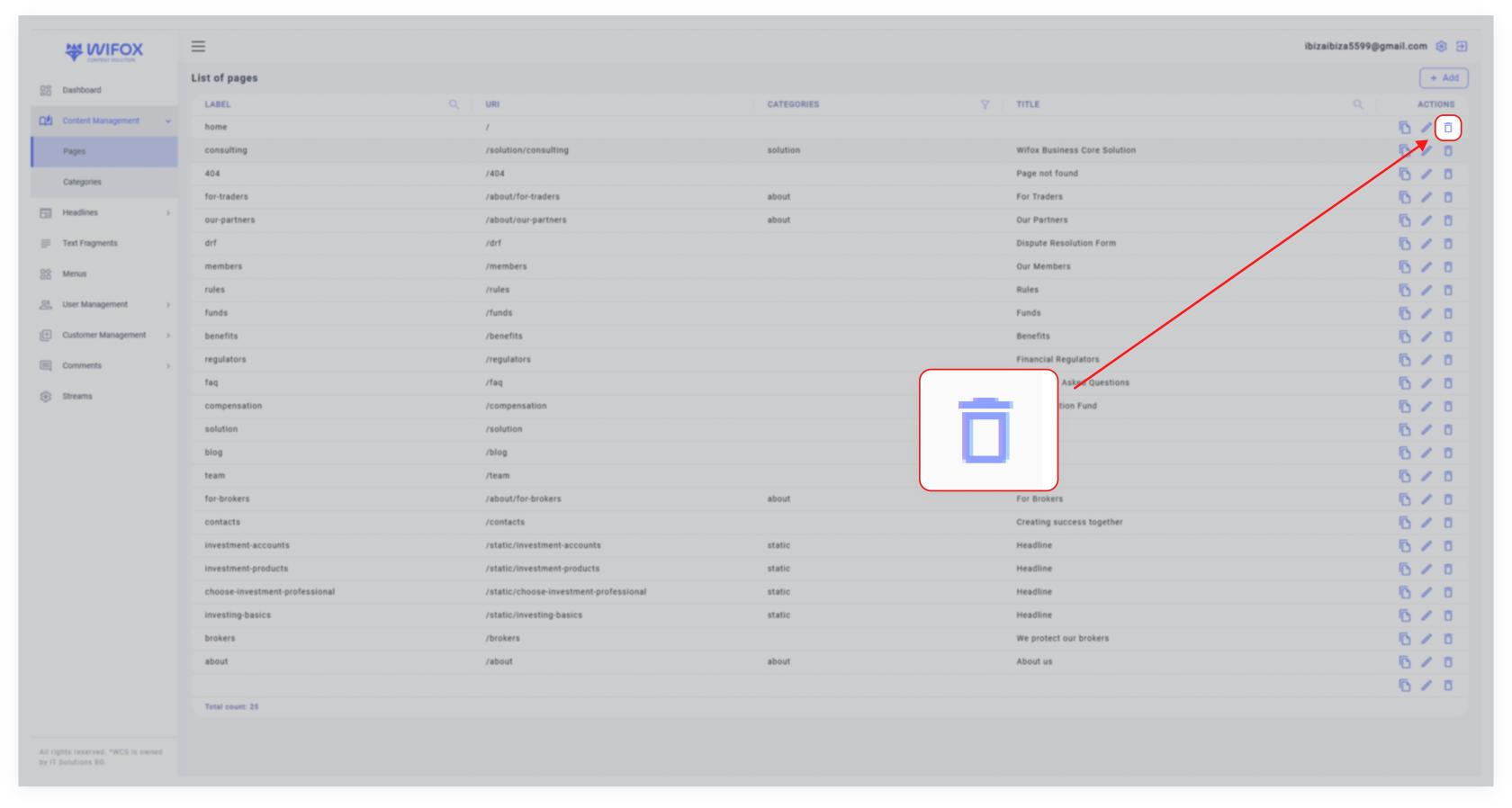
<span style="font-size: 12pt; font-family: Arial, sans-serif; color: rgb(161, 163, 165); background-color: transparent; font-weight: 400; font-style: normal; font-variant: normal; text-decoration: none; vertical-align: baseline; white-space: pre-wrap;">1. Locate the text entry in the list view.</span>

<span style="color: rgb(161, 163, 165);"><span style="font-size: 12pt; font-family: Arial, sans-serif; background-color: transparent; font-weight: 400; font-style: normal; font-variant: normal; text-decoration: none; vertical-align: baseline; white-space: pre-wrap;">2. Click the </span><span style="font-size: 12pt; font-family: Arial, sans-serif; background-color: transparent; font-weight: bold; font-style: normal; font-variant: normal; text-decoration: none; vertical-align: baseline; white-space: pre-wrap;">Delete Icon</span><span style="font-size: 12pt; font-family: Arial, sans-serif; background-color: transparent; font-weight: 400; font-style: normal; font-variant: normal; text-decoration: none; vertical-align: baseline; white-space: pre-wrap;"> in the "Actions" column.</span></span>

<span style="color: rgb(161, 163, 165);"><span style="font-size: 12pt; font-family: Arial, sans-serif; background-color: transparent; font-weight: 400; font-style: normal; font-variant: normal; text-decoration: none; vertical-align: baseline; white-space: pre-wrap;">3. Confirm the deletion.</span></span>

<p class="callout info"><span style="color: rgb(53, 152, 219);"><span style="font-size: 12pt; font-family: Arial, sans-serif; background-color: transparent; font-weight: bold; font-style: normal; font-variant: normal; text-decoration: none; vertical-align: baseline; white-space: pre-wrap;">Note</span><span style="font-size: 12pt; font-family: Arial, sans-serif; background-color: transparent; font-weight: 400; font-style: normal; font-variant: normal; text-decoration: none; vertical-align: baseline; white-space: pre-wrap;">: Deleting a text entry will remove it from all associated locations on the website.</span></span></p>