# Menus


# 1. Menu Section: Overview

<span style="color: rgb(161, 163, 165);">The Menu section in Wifox Business Content Solution allows you to manage the structure and content of navigation menus for your website. It provides a tree-based view where users can create, edit, and organize menus and submenus, ensuring that site navigation is intuitive and user-friendly.</span>

<p class="callout info"><span style="color: rgb(53, 152, 219);">For example, menus are categorized into different sections such as the Main Menu, Footer Menu, and other custom menus (e.g., About Menu). Each menu item is associated with a label, URL, and sometimes a hierarchy for grouping related links.</span></p>

<span style="font-size: 14pt; font-family: Arial, sans-serif; color: rgb(161, 163, 165); background-color: transparent; font-weight: bold; font-style: normal; font-variant: normal; text-decoration: none; vertical-align: baseline; white-space: pre-wrap;">Key Features of the Menu Section</span>

- <span style="color: rgb(161, 163, 165);"><span style="font-size: 12pt; font-family: Arial, sans-serif; background-color: transparent; font-weight: bold; font-style: normal; font-variant: normal; text-decoration: none; vertical-align: baseline; white-space: pre-wrap;">Tree View Structure</span><span style="font-size: 12pt; font-family: Arial, sans-serif; background-color: transparent; font-weight: 400; font-style: normal; font-variant: normal; text-decoration: none; vertical-align: baseline; white-space: pre-wrap;">:</span></span>

<span style="color: rgb(161, 163, 165);"><span style="font-size: 12pt; font-family: Arial, sans-serif; background-color: transparent; font-weight: 400; font-style: normal; font-variant: normal; text-decoration: none; vertical-align: baseline; white-space: pre-wrap;"><span style="border: none; display: inline-block; overflow: hidden; width: 481px; height: 573px;">![Зображення, що містить текст, знімок екрана, Шрифт, число

Автоматично згенерований опис](https://lh7-rt.googleusercontent.com/docsz/AD_4nXepNdNml1LdxdrNl_dlZ2nUgspTrJC_zmfIlSXenRNXNL7kp3sb6zVAzNTOO7lHXx4WxEfaB7_EurDEwu9w-ysMufbtS8htdMrn-2B6urYdx_VWTrX4PzXEMIvHWo1egF51EZc5Ew?key=0gy6H2urLwUKcuJX_5Q8Ycab)</span></span><span style="font-size: 12pt; font-family: Arial, sans-serif; background-color: transparent; font-weight: 400; font-style: normal; font-variant: normal; text-decoration: none; vertical-align: baseline; white-space: pre-wrap;">  
</span><span style="font-size: 12pt; font-family: Arial, sans-serif; background-color: transparent; font-weight: 400; font-style: normal; font-variant: normal; text-decoration: none; vertical-align: baseline; white-space: pre-wrap;">Displays menus in a tree format, allowing users to visualize the hierarchy of menu items and their submenus.</span></span>

<span style="color: rgb(161, 163, 165);"><span style="font-size: 12pt; font-family: Arial, sans-serif; background-color: transparent; font-weight: bold; font-style: normal; font-variant: normal; text-decoration: none; vertical-align: baseline; white-space: pre-wrap;">Main Menu</span><span style="font-size: 12pt; font-family: Arial, sans-serif; background-color: transparent; font-weight: 400; font-style: normal; font-variant: normal; text-decoration: none; vertical-align: baseline; white-space: pre-wrap;">: </span><span style="font-size: 10pt; font-family: Arial, sans-serif; background-color: transparent; font-weight: 400; font-style: normal; font-variant: normal; text-decoration: none; vertical-align: baseline; white-space: pre-wrap;">/main</span></span>

<span style="color: rgb(161, 163, 165);"><span style="font-size: 12pt; font-family: Arial, sans-serif; background-color: transparent; font-weight: bold; font-style: normal; font-variant: normal; text-decoration: none; vertical-align: baseline; white-space: pre-wrap;">Footer Menu</span><span style="font-size: 12pt; font-family: Arial, sans-serif; background-color: transparent; font-weight: 400; font-style: normal; font-variant: normal; text-decoration: none; vertical-align: baseline; white-space: pre-wrap;">: </span><span style="font-size: 10pt; font-family: Arial, sans-serif; background-color: transparent; font-weight: 400; font-style: normal; font-variant: normal; text-decoration: none; vertical-align: baseline; white-space: pre-wrap;">/footer</span></span>

<span style="color: rgb(161, 163, 165);"><span style="font-size: 12pt; font-family: Arial, sans-serif; background-color: transparent; font-weight: bold; font-style: normal; font-variant: normal; text-decoration: none; vertical-align: baseline; white-space: pre-wrap;">About Menu</span><span style="font-size: 12pt; font-family: Arial, sans-serif; background-color: transparent; font-weight: 400; font-style: normal; font-variant: normal; text-decoration: none; vertical-align: baseline; white-space: pre-wrap;">: </span><span style="font-size: 10pt; font-family: Arial, sans-serif; background-color: transparent; font-weight: 400; font-style: normal; font-variant: normal; text-decoration: none; vertical-align: baseline; white-space: pre-wrap;">/about</span></span>

- <span style="color: rgb(161, 163, 165);"><span style="font-size: 12pt; font-family: Arial, sans-serif; background-color: transparent; font-weight: bold; font-style: normal; font-variant: normal; text-decoration: none; vertical-align: baseline; white-space: pre-wrap;">Save and Add Options</span><span style="font-size: 12pt; font-family: Arial, sans-serif; background-color: transparent; font-weight: 400; font-style: normal; font-variant: normal; text-decoration: none; vertical-align: baseline; white-space: pre-wrap;">:</span></span>

<span style="color: rgb(161, 163, 165);"><span style="font-size: 12pt; font-family: Arial, sans-serif; background-color: transparent; font-weight: bold; font-style: normal; font-variant: normal; text-decoration: none; vertical-align: baseline; white-space: pre-wrap;">1. Save</span><span style="font-size: 12pt; font-family: Arial, sans-serif; background-color: transparent; font-weight: 400; font-style: normal; font-variant: normal; text-decoration: none; vertical-align: baseline; white-space: pre-wrap;">: Finalize changes made to the menu.</span></span>

<span style="color: rgb(161, 163, 165);"><span style="font-size: 12pt; font-family: Arial, sans-serif; background-color: transparent; font-weight: bold; font-style: normal; font-variant: normal; text-decoration: none; vertical-align: baseline; white-space: pre-wrap;">2. Add</span><span style="font-size: 12pt; font-family: Arial, sans-serif; background-color: transparent; font-weight: 400; font-style: normal; font-variant: normal; text-decoration: none; vertical-align: baseline; white-space: pre-wrap;">: Add new menu items or submenus to the desired section.</span></span>

<p class="callout info"><span id="bkmrk-hierarchical-organiz-1" style="font-weight: normal; color: rgb(161, 163, 165);"><span style="font-size: 12pt; font-family: Arial, sans-serif; background-color: transparent; font-weight: bold; font-style: normal; font-variant: normal; white-space-collapse: preserve;">Hierarchical Organization</span><span style="font-size: 12pt; font-family: Arial, sans-serif; background-color: transparent; font-weight: 400; font-style: normal; font-variant: normal; white-space-collapse: preserve;">: </span><span style="font-size: 12pt; font-family: Arial, sans-serif; background-color: transparent; font-weight: 400; font-style: normal; font-variant: normal; white-space-collapse: preserve;">Each menu can contain multiple sections, like </span><span style="font-size: 12pt; font-family: Arial, sans-serif; background-color: transparent; font-weight: bold; font-style: normal; font-variant: normal; white-space-collapse: preserve;">About, Explore</span><span style="font-size: 12pt; font-family: Arial, sans-serif; background-color: transparent; font-weight: 400; font-style: normal; font-variant: normal; white-space-collapse: preserve;">, and </span><span style="font-size: 12pt; font-family: Arial, sans-serif; background-color: transparent; font-weight: bold; font-style: normal; font-variant: normal; white-space-collapse: preserve;">Legal &amp; Policies</span><span style="font-size: 12pt; font-family: Arial, sans-serif; background-color: transparent; font-weight: 400; font-style: normal; font-variant: normal; white-space-collapse: preserve;">, which further include submenus linked to specific pages.</span></span></p>

# 2. Use Cases

#### **1. For Website Menus (Header, Footer, Additional Menus)**

- ##### **Use Case #1: Structuring the Main Menu**

Businesses can organize their header navigation with primary categories such as Home, Services, Products, and Contact.

For e-commerce websites, group options like "Shop by Category," "New Arrivals," and "Sales" under dropdowns to streamline the shopping experience.

Example: A travel agency might include "Destinations," "Tours," and "Travel Tips" in its main menu.

- ##### **Use Case #2: Customizing Footer Menus**

Add links to secondary content, such as Terms &amp; Conditions, Privacy Policy, Careers, and FAQ, in the footer menu.

This keeps the main navigation clean while ensuring users can still find crucial resources.

Example: A tech company could include "Investor Relations" and "Press Releases" in the footer.

- ##### **Use Case #3: Organizing Additional Menus**

Use custom menus for targeted sections, such as blogs, galleries, or resources.

Example: A non-profit organization might create an “About Menu” with links like "Our Mission," "Leadership," and "Impact Stories."

#### **2. For Shop Categories and Breadcrumbs**

- ##### **Use Case #4: Creating Shop Categories**

Categorize products by type, purpose, or brand using menus that integrate seamlessly with e-commerce platforms.

Example: A fashion retailer could group products under "Men's Wear," "Women's Wear," and "Accessories."

- ##### **Use Case #5: Managing Breadcrumb Navigation**

Use hierarchical menus to auto-generate breadcrumbs for better user navigation and SEO benefits.

Example: In an electronics store, breadcrumbs might display: Home &gt; Electronics &gt; Smartphones &gt; Brand Name.

#### **3. For User-Specific Navigation**

- ##### **Use Case #6: Personalized Menus for Different User Groups**

Create custom menus for different user types (e.g., "For Brokers," "For Affiliates").

Example: A financial service platform can have separate menus for "Individual Investors" and "Corporate Clients," each featuring tailored resources.

- ##### **Use Case #7: Supporting Multilingual Websites**

Build separate menus for each language, allowing global businesses to cater to diverse audiences.

Example: A global news website might offer menus in English, Spanish, and French, each localized for regional content.

# 3. How to Add a New Menu or Menu Item

<span style="color: rgb(161, 163, 165);"><span style="font-size: 12pt; font-family: Arial, sans-serif; background-color: transparent; font-weight: bold; font-style: normal; font-variant: normal; text-decoration: none; vertical-align: baseline; white-space: pre-wrap;">1. Click Add</span><span style="font-size: 12pt; font-family: Arial, sans-serif; background-color: transparent; font-weight: 400; font-style: normal; font-variant: normal; text-decoration: none; vertical-align: baseline; white-space: pre-wrap;">: Click the </span><span style="font-size: 12pt; font-family: Arial, sans-serif; background-color: transparent; font-weight: bold; font-style: normal; font-variant: normal; text-decoration: none; vertical-align: baseline; white-space: pre-wrap;">"+"</span><span style="font-size: 12pt; font-family: Arial, sans-serif; background-color: transparent; font-weight: 400; font-style: normal; font-variant: normal; text-decoration: none; vertical-align: baseline; white-space: pre-wrap;"> button at the top-right of the Menu section.</span></span>

<span style="font-size: 12pt; font-family: Arial, sans-serif; color: rgb(161, 163, 165); background-color: transparent; font-weight: 400; font-style: normal; font-variant: normal; text-decoration: none; vertical-align: baseline; white-space: pre-wrap;"><span style="border: none; display: inline-block; overflow: hidden; width: 556px; height: 293px;">![Зображення, що містить текст, знімок екрана, Шрифт, дизайн

Автоматично згенерований опис](https://lh7-rt.googleusercontent.com/docsz/AD_4nXccRGLLvIlAOvU7ohc26EVHLSi6ZaBtu8892IAp4kdkhPvZPZCEUKzEWTZeMq8PJ1ZhwOsAt-C9ZtAp5kc_WNLALMEscTQNiJOTdfrbddgMesK2pVMusQxONKGUZLkcE0ot6-zU?key=0gy6H2urLwUKcuJX_5Q8Ycab)</span></span>

<span style="color: rgb(161, 163, 165);"><span style="font-size: 12pt; font-family: Arial, sans-serif; background-color: transparent; font-weight: bold; font-style: normal; font-variant: normal; text-decoration: none; vertical-align: baseline; white-space: pre-wrap;">2. Enter Details</span><span style="font-size: 12pt; font-family: Arial, sans-serif; background-color: transparent; font-weight: 400; font-style: normal; font-variant: normal; text-decoration: none; vertical-align: baseline; white-space: pre-wrap;">:</span></span>

<span style="font-size: 12pt; font-family: Arial, sans-serif; color: rgb(161, 163, 165); background-color: transparent; font-weight: 400; font-style: normal; font-variant: normal; text-decoration: none; vertical-align: baseline; white-space: pre-wrap;"><span style="border: none; display: inline-block; overflow: hidden; width: 540px; height: 1009px;">![Зображення, що містить текст, знімок екрана, схема, Шрифт

Автоматично згенерований опис](https://lh7-rt.googleusercontent.com/docsz/AD_4nXfQP6Saqw5egUwAsbm8cP-nl8IRcuMrT5SJ2Bp_T-1ZnKUTTTJtaEiIZzrCFX-6NH-A-NGwLTfl5VcUDSXuY4IpNWMx0WvSg-VqTXpGJTDXm2DexiemsgyEgBulmy1cvc3fMR-JrA?key=0gy6H2urLwUKcuJX_5Q8Ycab)</span></span>

- <span style="color: rgb(161, 163, 165);"><span style="font-size: 12pt; font-family: Arial, sans-serif; background-color: transparent; font-weight: bold; font-style: normal; font-variant: normal; text-decoration: none; vertical-align: baseline; white-space: pre-wrap;">Label</span><span style="font-size: 12pt; font-family: Arial, sans-serif; background-color: transparent; font-weight: 400; font-style: normal; font-variant: normal; text-decoration: none; vertical-align: baseline; white-space: pre-wrap;">: Provide a label for the menu or item (e.g., "Contact Us").</span></span>
- <span style="color: rgb(161, 163, 165);"><span style="font-size: 12pt; font-family: Arial, sans-serif; background-color: transparent; font-weight: bold; font-style: normal; font-variant: normal; text-decoration: none; vertical-align: baseline; white-space: pre-wrap;">URL</span><span style="font-size: 12pt; font-family: Arial, sans-serif; background-color: transparent; font-weight: 400; font-style: normal; font-variant: normal; text-decoration: none; vertical-align: baseline; white-space: pre-wrap;">: Enter the URL where the menu item should link (e.g., </span><span style="font-size: 10pt; font-family: Arial, sans-serif; background-color: transparent; font-weight: 400; font-style: normal; font-variant: normal; text-decoration: none; vertical-align: baseline; white-space: pre-wrap;">/contact-us</span><span style="font-size: 12pt; font-family: Arial, sans-serif; background-color: transparent; font-weight: 400; font-style: normal; font-variant: normal; text-decoration: none; vertical-align: baseline; white-space: pre-wrap;">).</span></span>
- <span style="color: rgb(161, 163, 165);"><span style="font-size: 12pt; font-family: Arial, sans-serif; background-color: transparent; font-weight: bold; font-style: normal; font-variant: normal; text-decoration: none; vertical-align: baseline; white-space: pre-wrap;">Parent Menu</span><span style="font-size: 12pt; font-family: Arial, sans-serif; background-color: transparent; font-weight: 400; font-style: normal; font-variant: normal; text-decoration: none; vertical-align: baseline; white-space: pre-wrap;">: If adding a submenu, select the parent menu (e.g., add "Contact Us" under "Legal &amp; Policies").</span></span>

<span style="color: rgb(161, 163, 165);"><span style="font-size: 12pt; font-family: Arial, sans-serif; background-color: transparent; font-weight: bold; font-style: normal; font-variant: normal; text-decoration: none; vertical-align: baseline; white-space: pre-wrap;">3. Save</span><span style="font-size: 12pt; font-family: Arial, sans-serif; background-color: transparent; font-weight: 400; font-style: normal; font-variant: normal; text-decoration: none; vertical-align: baseline; white-space: pre-wrap;">: Click </span><span style="font-size: 12pt; font-family: Arial, sans-serif; background-color: transparent; font-weight: bold; font-style: normal; font-variant: normal; text-decoration: none; vertical-align: baseline; white-space: pre-wrap;">Submit</span><span style="font-size: 12pt; font-family: Arial, sans-serif; background-color: transparent; font-weight: 400; font-style: normal; font-variant: normal; text-decoration: none; vertical-align: baseline; white-space: pre-wrap;"> to apply changes.</span></span>

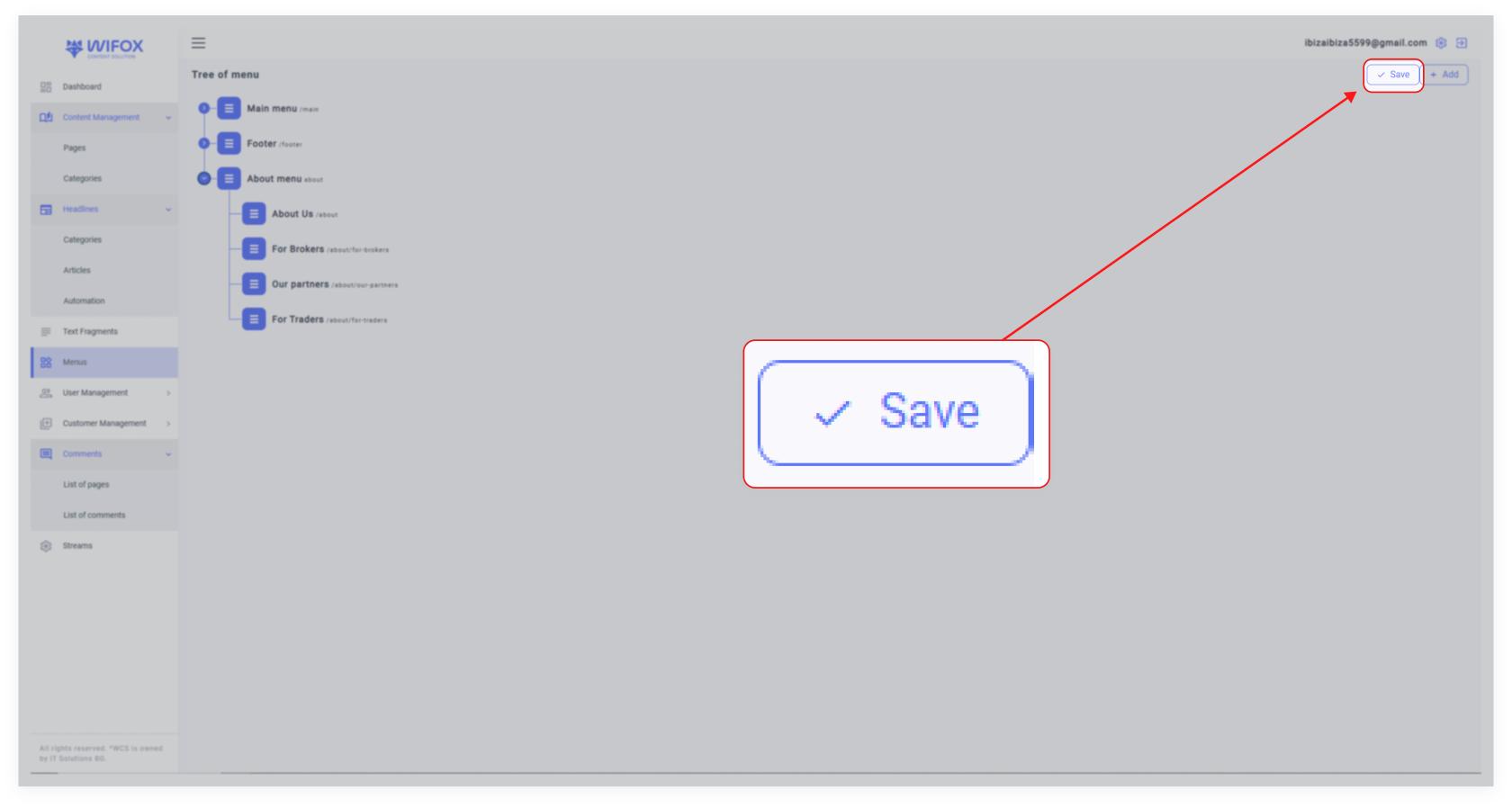
<span style="color: rgb(161, 163, 165);"><span style="font-size: 12pt; font-family: Arial, sans-serif; background-color: transparent; font-weight: 400; font-style: normal; font-variant: normal; text-decoration: none; vertical-align: baseline; white-space: pre-wrap;">**4.** Save entire menu updates by clicking **"Save"** at the top right corner of the Menu page</span></span>

<span id="bkmrk--3" style="font-weight: normal; color: rgb(161, 163, 165);"></span>

[![10,01 (17).jpg](https://wiki.wi.services/uploads/images/gallery/2025-04/scaled-1680-/1001-17.jpg)](https://wiki.wi.services/uploads/images/gallery/2025-04/1001-17.jpg)

# 4. How to Edit or Delete a Menu Item

<span style="font-size: 12pt; font-family: Arial, sans-serif; color: rgb(161, 163, 165); background-color: transparent; font-weight: 400; font-style: normal; font-variant: normal; text-decoration: none; vertical-align: baseline; white-space: pre-wrap;">1. Locate the menu or submenu you want to modify in the tree view.</span>

<span style="color: rgb(161, 163, 165);"><span style="font-size: 12pt; font-family: Arial, sans-serif; background-color: transparent; font-weight: bold; font-style: normal; font-variant: normal; text-decoration: none; vertical-align: baseline; white-space: pre-wrap;">2. Edit</span><span style="font-size: 12pt; font-family: Arial, sans-serif; background-color: transparent; font-weight: 400; font-style: normal; font-variant: normal; text-decoration: none; vertical-align: baseline; white-space: pre-wrap;">: Click the </span><span style="font-size: 12pt; font-family: Arial, sans-serif; background-color: transparent; font-weight: bold; font-style: normal; font-variant: normal; text-decoration: none; vertical-align: baseline; white-space: pre-wrap;">Edit Icon (Pencil)</span><span style="font-size: 12pt; font-family: Arial, sans-serif; background-color: transparent; font-weight: 400; font-style: normal; font-variant: normal; text-decoration: none; vertical-align: baseline; white-space: pre-wrap;"> to update the label or URL of the menu item.</span></span>

<span style="font-size: 12pt; font-family: Arial, sans-serif; color: rgb(161, 163, 165); background-color: transparent; font-weight: 400; font-style: normal; font-variant: normal; text-decoration: none; vertical-align: baseline; white-space: pre-wrap;"><span style="border: none; display: inline-block; overflow: hidden; width: 482px; height: 187px;">![Зображення, що містить текст, знімок екрана, Шрифт, схема

Автоматично згенерований опис](https://lh7-rt.googleusercontent.com/docsz/AD_4nXcVJwnhZOA-FuKI3SQELAu7j_rlDk7_S7MpATdmbyzA8LWaVrKzbll8brzlmzDQoqnJ_KX3_gGjh4-yRgyV0vIIapQnAEQyeyvvg6vDbU1sEJ_SRF1qsZ8DTSSuPLIor9lgfMOM6Q?key=0gy6H2urLwUKcuJX_5Q8Ycab)</span></span>

<span id="bkmrk--2" style="font-weight: normal; color: rgb(161, 163, 165);"></span>

<span style="color: rgb(161, 163, 165);"><span style="font-size: 12pt; font-family: Arial, sans-serif; background-color: transparent; font-weight: bold; font-style: normal; font-variant: normal; text-decoration: none; vertical-align: baseline; white-space: pre-wrap;">3. Delete</span><span style="font-size: 12pt; font-family: Arial, sans-serif; background-color: transparent; font-weight: 400; font-style: normal; font-variant: normal; text-decoration: none; vertical-align: baseline; white-space: pre-wrap;">: Click the </span><span style="font-size: 12pt; font-family: Arial, sans-serif; background-color: transparent; font-weight: bold; font-style: normal; font-variant: normal; text-decoration: none; vertical-align: baseline; white-space: pre-wrap;">Delete Icon</span><span style="font-size: 12pt; font-family: Arial, sans-serif; background-color: transparent; font-weight: 400; font-style: normal; font-variant: normal; text-decoration: none; vertical-align: baseline; white-space: pre-wrap;"> to remove the menu or submenu.</span></span>