Getting started
1. What is Wifox Business Content Solution?
WiFox Business Content Solution is a comprehensive CMS platform powered by Node JS, designed to simplify the management of organizational content, events, and operational workflows. It offers businesses a centralized solution to streamline their internal and external communications, enhance content delivery, and efficiently handle events.
This all-in-one suite empowers organizations to maintain structure and consistency across their digital and operational processes, making it a valuable tool for businesses of all sizes.
Integrated OpenAI
Wifox Business Content Solution is built on an OpenAI-powered system that provides seamless and intelligent control over the entire platform. This advanced technology is integrated across all key modules, enabling automation, optimization, and effortless management of content, metadata, SEO, and more.
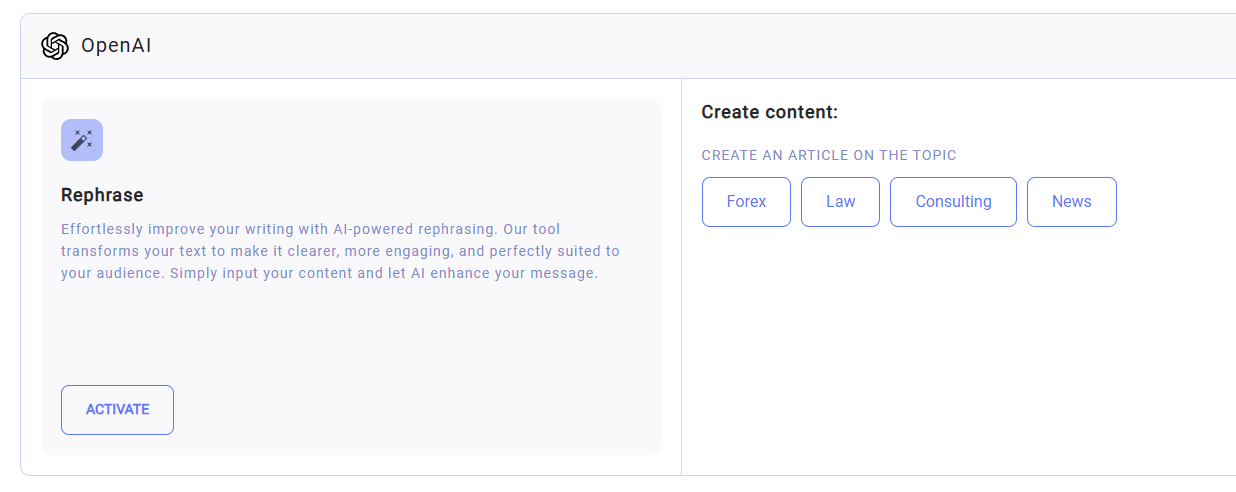
What Makes This System Special?
- Centralized Control: AI coordinates and synchronizes all components of the system, ensuring smooth and efficient operation.
- Process Automation: Routine tasks such as content creation, metadata optimization, and translations are handled by AI, freeing users to focus on strategic goals.
- Flexibility and Adaptability: Intelligent algorithms adapt to specific user needs and assist in making effective decisions.
- Enhanced Productivity: Tasks are completed faster and with greater precision, thanks to automation and intelligent analysis.
How It Works
The AI system is integrated into Wifox Business Content Solution for:
- Content Management: AI generates, optimizes, and edits both text and visual content.
- Multi-Category System: Automatically organizes data and manages pages, events, users, and clients.
- SEO and Localization: AI optimizes pages for search engines and generates translations for multilingual use.
- Interactive Interface: Users can easily configure and control the system through an intuitive interface while AI handles complex calculations and operations in the background.
Wifox Business Content Solution is more than just a content management system—it’s a fully intelligent assistant that takes control of the platform’s entire ecosystem. It’s the ideal solution for those looking to automate workflows, enhance efficiency, and make their system as functional and user-friendly as possible.
2. Dashboard
The Dashboard section in Wifox Business Content Solution provides a centralized overview of the system's key metrics and recent activities, enabling users to monitor the platform's content and event management progress quickly. It is designed to provide essential statistics and allow quick navigation to detailed views of pages and events.
Key Features of the Dashboard
1. Pages Overview

Total Pages: Displays the total number of pages created in the system (e.g., "22 Pages").
Added Per Month: Indicates the number of new pages added in the current month (e.g., "Added per month: 0").
Last Pages: Lists the three most recently created or updated pages, along with their creation dates and times.
Example:
- 404 - Created on 05.12.24 at 11:09
- For Traders - Created on 05.12.24 at 11:09
- Our Partners - Created on 05.12.24 at 11:09
2. Events Overview

Total Events: Displays the total number of events created in the system (e.g., "39 Events").
Added Per Month: Indicates the number of new events added in the current month (e.g., "Added per month: 0").
Last Events: Lists the three most recently created or updated events, along with their creation dates and times.
Benefits of the Dashboard Section
- Quick Insights: Provides a snapshot of current activities, making tracking progress and identifying recent changes easier.
- Time Management: Saves time by displaying key data at a glance instead of navigating through multiple sections.
- Actionable Navigation: Direct links to the full lists of pages and events allow users to access and manage specific content or events quickly.
- Real-Time Updates: Reflects any changes or additions made to pages or events instantly, keeping data up-to-date.
Use Case
A manager logs into Wifox Business Content Solution to check the status of recent updates. Using the Dashboard, they notice that three pages and three events have been recently added or modified. From here, they click on Full List under "Events" to review all pages and ensure everything aligns with the project goals.
3. Users
The Users section in Wifox Business Content Solution provides an overview and management of all user accounts created within the system. It is designed to offer administrators a clear picture of system usage and user activity while providing quick access to user details.

Key Features of the Users Section
- User Count: Displays the total number of users created in the system (e.g., "3 Users").
- Monthly Additions: Indicates how many new users were added in the current month (e.g., "Added per month: 0").
- Recent Logins: Lists the three most recent user logins, showing the user’s email address and login time.
Benefits of the Users Section
- Comprehensive Overview: Keeps track of all user accounts, providing insight into system utilization.
- Efficient Management: Quickly identify the most recent system users and their last login times.
- Security Monitoring: Helps administrators monitor user activity for security and accountability.
Use Case
A system administrator needs to verify if a developer has recently accessed the system. By checking the Users section, they can see that the developer logged in on 18.01.25 at 15:56. From there, they can navigate to the full list for additional details.
4. Clients
The Clients section in Wifox Business Content Solution provides tools for managing client records, including creating, updating, and deleting client details. It enables administrators to maintain accurate and up-to-date client information efficiently.

Key Features of the Clients Section
- Client Count: Displays the total number of clients in the system and the number added in the current month.
- Recent Clients: Shows the most recently added clients, with their email addresses and registration dates.
- Full List Access: Provides a comprehensive view of all clients in the system for in-depth management.

When adding or editing a client, the following details can be managed in the General section:
- E-mail: The client's primary contact email address.
- Password: The password associated with the client account (hidden for security).
- Name: The client’s name or identifier.
- Phone: The client’s phone number.
- Active: A checkbox indicating if the client account is active.
- Registration Date: The date and time the client was added to the system.
- Comments: Additional notes or remarks about the client.
Benefits of the Clients Section
- Streamlined Client Management: Simplifies the process of updating or deleting client records directly from the interface.
- Quick Additions: Allows new clients to be added easily and efficiently.
- Detailed Records: Provides comprehensive fields to capture all relevant client details.
Use Case
Clients Management A sales manager logs into Wifox Business Content Solution to verify recent client additions. They quickly identify two new clients this month in the "Recent Clients" section. To review detailed information and update records, they click "Full List," ensuring client data remains accurate and current.