
Release 1.0.7 (29.08.2024)
Features:
- WICRM-288 - Export Transactions and Clients to CSV
- Added a new feature allowing users to export transaction history and client data in CSV format. This enables easier data manipulation and reporting outside the platform, such as for external audits or business analysis.
- WR-373 - Enforce Two-Factor Authentication (2FA) Methods
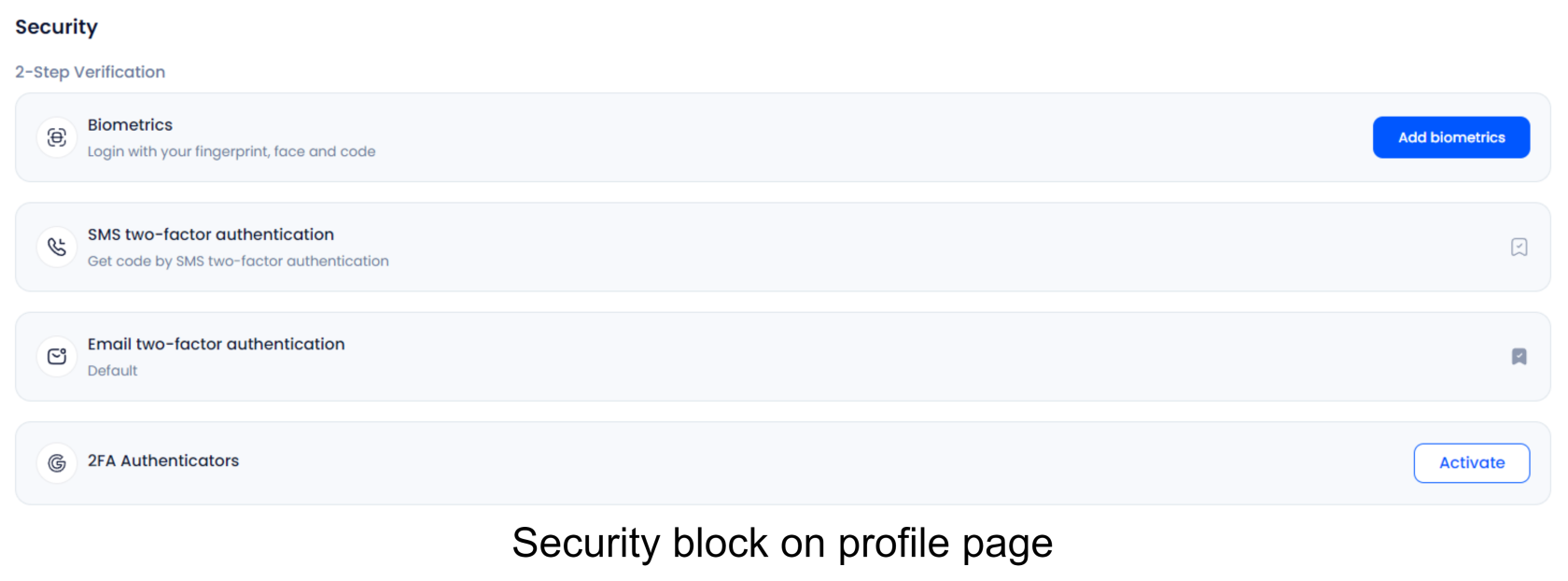
- Updated the registration process to require two non-removable 2FA methods: email and phone. After account creation, the user will automatically have both methods enabled, with email set as the default. Users cannot delete these 2FA methods but can change the default method in their settings.
- WR-372 - Restrict Account Access Until Phone Verification
- Implemented a restriction that prevents users from accessing their personal account until their phone number is verified. This adds an extra layer of security by ensuring that users confirm their identity via phone before proceeding. The "skip for now" option, previously allowing users to bypass phone verification, has been removed.
- WR-376 - Normalize Email Input and Trim Sensitive Data
- Improved the way user email addresses are handled by converting them to lowercase before storing them on the server. Additionally, any sensitive data (such as names or email addresses) is now automatically trimmed to remove unnecessary spaces, reducing the risk of errors during data processing.
- WR-377 - Semaphore Integration for Exchange and Withdrawal
- Integrated a semaphore mechanism to regulate simultaneous transactions. This prevents users from initiating multiple steps in transactions that could result in negative balances. For example, if a user performs an exchange or withdrawal, the system will now ensure that both assets involved are accurately updated without conflicts.
- WR-392 - Add Hash Column and Display Transaction Type
- Added a new column in the transaction records to display the hash value for internal transactions, ensuring better traceability and transparency. Additionally, the type of each transaction is now clearly displayed to help users differentiate between various transaction types.
- WR-393 - Clear Input Fields After Incorrect Code Entered
- Improved the user experience when entering incorrect codes by automatically clearing the input fields. This ensures that users don’t have to manually delete incorrect entries and can re-enter the correct information without confusion.
Bugfixes:
- WR-358 - Remove Notification for Login 2FA Error
- Removed unnecessary and misleading error notifications that appeared when there was an issue with logging in using 2FA. This prevents confusion and enhances the overall login experience.
- WR-394 - Fix for Deactivated Client Login Issue
- Resolved a bug where users with deactivated accounts were still able to access their personal cabinets. Now, if an account is deactivated, the user will be blocked from logging in, ensuring compliance with account management rules.
- WR-111 - Corrected Error Message on Security Page
- Fixed a misleading or incorrect error message that was displayed on the "Improve Security" page, making it clearer for users to understand the actions they need to take.
No Comments