Releases – Archived (Vova’s Memories)
- CRM Core Banking
- Release 1.0.2
- Release 1.0.3 (27.08.2024)
- Release 1.0.4 (11.09.2024)
- Release 1.2.0
- Release 1.3.0 (31.10.2024)
- Release 1.3.2 (06.11.2024)
- Release 1.4.0
- Release 1.5.0
- Release 1.6.0
- Release 1.7.0
- Release 1.8.0
- Release 1.9.0
- Release 1.10.0
- Release 1.11.0
- Release 1.12.0
- Release 1.13.0
- Release 1.14.0
- CRM Core Releases
- Release 1.0.3
- Release 1.0.4 (27.08.2024)
- Release 1.1.0 (11.09.2024)
- Release 1.2.0(23.10.2024)
- Release 1.3.0(31.10.2024)
- Release 1.3.2 (06.11.2024)
- Release 1.4.0 (13.12.2024)
- Release 1.5.0 (11.01.2025)
- Release 1.6.0
- Release 1.7.0
- Release 1.8.0
- Release 1.9.0
- Release 1.10.0
- Release 1.11.0
- Release 1.12.0
- Release 1.13.0
- Release 1.14.0
- CRM Analitycs MS
- Release 1.0.0
- Release 1.1.0
- Release 1.2.0
- Release 1.11.0
- Release 1.12.0
- Release 1.13.0
- Release 1.14.0
- CRM Security MS
- Release 1.8.0
- Release 1.9.0
- Release 1.10.0
- Release 1.11.0
- Release 1.12.0
- Release 1.13.0
- Release 1.14.0
- CRM Marketplace
- Release 1.0.0
- Release 1.1.0
- Release 1.10.0
- Release 1.11.0
- Release 1.12.0
- Release 1.13.0
- Release 1.14.0
- CRM Integrations
- CRM Businesses
- CRM - CI/CD MS
- CRM Logs MS
- CRM Access MS
- CRM Reports MS
- CRM Uploads MS
- CRM Notifications MS
- CRM Exchange rates grabber
CRM Core Banking
Release 1.0.2
Features:
- WIBR-146 - UTIP WebTerminal integration with API
- WICRM-227 - Refresh token implementation
- WICRM-282 - Add logger to Core banking and Finance
- WIBR-158 - Move account creating by registration to facade
- WICRM-290 - add decr and source/destination input in transaction from crm
- WICRM-14 - Unit - Jest - resolveWithdrawalSystems method testing
- WICRM-15 - Unit - Jest - resolveSingleWithdrawalSystem method testing
Release 1.0.3 (27.08.2024)
Features:
- WICRM-295 - Add multisearch for Employees module
- Now the employee search has become more convenient by adding new search fields. Search by email and name fields
- WICRM-289 - Reimplementation of Wallets
- Changed the approach of displaying wallets for assets. Now it is not a separate page as it was before. When you go back to an asset for which a wallet was displayed, the wallet is highlighted
- WICRM-294 - Logs tab markup
- WICRM-305 - Do not log initial requests
- WICRM-298 - Create Logs module, client logs submodule
- The given three points above can be defined as one big feature. Implements a log module that saves any activity that may come from both CRM managers and customers on the site. An example of such an activity could be a manager changing customer data, creating a transaction manually for a specific user. All this is now conveniently displayed in a special Logs tab, as well as separately in the tabs of user and employee.
- WICRM-288 - Add csv export for transactions and clients
- WICRM-303 - Implement TFA block with ability to edit and delete to Employees edit form
- Implements a more convenient display for TFA methods for employees. This block allows you to view which TFA methods are already available for a selected employee, as well as to edit some of these methods and delete them.
 TFA block without any 2FA methods
 if employee has 2FA method
- WICRM-239 - TFA markup - add icon for email tfa
- Added an icon to display the TFA email
- WICRM-6 - Unit - Jest - resolveTexts method testing
- WICRM-293 - Show transactions by asset tables
- Now you can view which transactions to perform separately for the selected asset. Now you don't need to sort transactions or invent any other way to do this
- WICRM-302 - After update client navigate to main clients page with filters
- After editing a customer and saving the changes the CRM manager will be redirected to the main users page with all filters that were selected before saved
- WICRM-290 - add decr and source/destination input in transaction from crm
- Added 2 additional fields to the transaction manual creation drawer
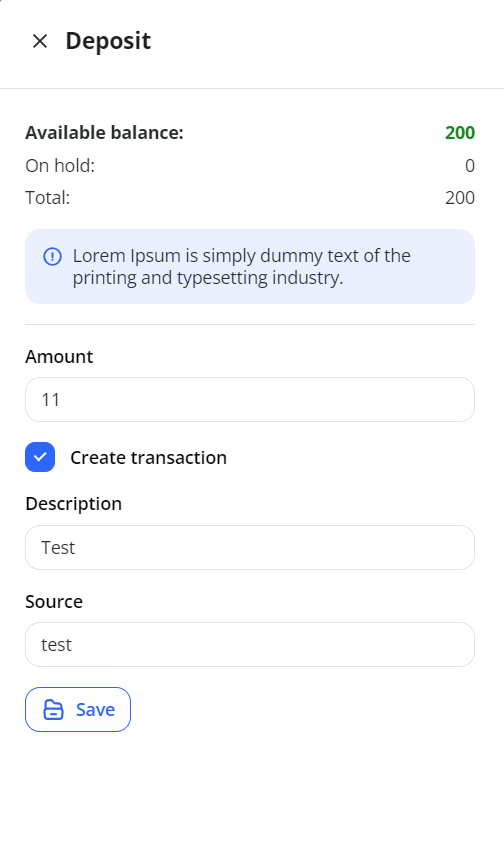
- WR-379 - Change creating of business client email (email)timestamp to timestamp(email)
- Changed the approach of saving email when creating a business account. Now the format will be timestamp_email, which will prevent future problems with business account editing.
- WR-376 - Convert user email to lower case. Trim sensative data in wiex client
- The e-mail address will now be saved with all lowercase letters.
- WICRM-304 - Implement history of transaction
- Implemented a new transaction history feature where the full path that a transaction takes will be stored. This includes any interactions with external systems, as well as its creation inside CRM
- WICRM-305 - Do not log initial requests
- WICRM-312 - Search client by _id
- Now the search works the same way by customer ID
Bugfixes:
- WR-365 - Remove gradient from agreement table
- Removed gradient at the bottom of the User agreement table
- WICRM-244 - Fee markup - change order
- WICRM-296 - Request is not created in Clients submodule
- Fixed a bug that made it impossible to create a request for a client
- WICRM-227 - Fix bug with token refreshing on polling
- WICRM-309 - Script don't see aliases
- WICRM-310 - Assigned users in Roles module not visible
- The “Assigned users” feature is now shown in the Actions column for the role table
 "Assigned users" button on "Actions" column
 Members drawer for assigned users feature
- WICRM-45 - Requests - extend functionality with dialogues - fix issues
- Fixed uploading files with PDF extension, as well as added a warning if the file size is larger than the file upload allowed in the system for messages tab in clients module
- WICRM-291 - Zeros in not visible in Company fees
- There was a problem when, when configuring the Company fee module, no number was specified in the “From” and “To” fields, but instead zero was written, which created problems with the use of the fees data
- WICRM-292 - Input sufix icon indent issue
- The indentation of all suffix icons has been corrected to the same value
- WR-394 - Fix issue with login of deactivated client
- A user with the status “deactivated” will now not be able to enter his personal cabinet and make any actions in it
Release 1.0.4 (11.09.2024)
Bugfixes:
- WICRM-227 - Refresh Token Implementation
- Implemented proper refresh token handling to ensure that active users are not logged out automatically during their session. This improves user experience by keeping users logged in while they are still interacting with the platform.
Features:
- WICRM - 348 - Remove checkbox 'Create transaction' and create transaction always
- WICRM-331 - Reimplement rights chaining to reduce the number of dependencies
- WR-408 - Check Remaining Balance on All Transactions
- Fixed an issue where the user's remaining balance (
restAmount) was incorrectly recorded after transactions. This fix ensures that the correct balance is displayed and used for reporting and other financial operations.
- Fixed an issue where the user's remaining balance (
- WICRM - 341 - Transactions info drawer in transactions module
- WICRM-133 - Remove mention of Crassula from service
Release 1.2.0
Features:
-
WIBR-279 - Decimal Precision Configuration for Currencies✅
-
Implemented the ability to configure the number of decimal places for each currency separately.
-
-
WICRM-383 - Company Fees "Apply For" Property and Payment System Compatibility
-
Added the "applyFor" property to company fees and ensured compatibility with different payment systems.
-
-
WIBR-276 - Bonus Feature for Deposits and Withdrawals✅
-
Implemented a bonus balance feature for deposits and withdrawals, with the bonus amounts tracked in a separate column.
-
-
WIBR-254 - Default Currency Option in Core Banking Configuration✅
-
Added the ability to mark a default currency in the Core Banking configuration settings.
-
-
WICRM-393 - Manager Column in Transactions Table✅
-
Added a new column to the transactions table that displays the manager responsible for each transaction.
-
Bugfixes:
-
WICRM-376 - Undefined Header in Transaction History✅
-
Fixed an issue where the transaction history header would display as "undefined" after a page reload.
-
Release 1.3.0 (31.10.2024)
Features
-
WICRM-436 - Asset Details Drawer ✅
- Added a detailed information drawer to the asset table, enhancing data visibility for both crypto and fiat assets. Additionally, the "view wallets" action for crypto assets was relocated to the "actions" column, making asset management more accessible and organized.
Bugfixes:
-
WICRM-385 - Asset Selection for Card Creation ✅
- Adjusted the asset selection process in the bank card creation workflow, now allowing users to select either a crypto or fiat asset without mandating both. This change simplifies the process and provides more flexibility in asset management.
Release 1.3.2 (06.11.2024)
Features
-
WICRM-479 - Automated Client Data Sync in Core-Banking✅
-
Added functionality for automatic updates of client data in the core-banking platform when edited in CRM, ensuring synchronized information across systems.
-
Bugfixes:
-
WICRM-495 - Fix for Null Desk Field in Transactions✅
-
Resolved an issue where a null value in the desk field caused errors in the transactions table. Transactions now handle null values in this field without breaking.
-
Release 1.4.0
Features
-
WICORE-55 - Update Currency Name in Core Banking
- The Name field for currencies in the Core Banking configuration can now be edited during the update action.
-
WICORE-59 - Default Currency for Accounts
- When creating a new account in Core Banking, a default currency is now automatically configured based on the Core Banking settings.
-
WICORE-102 - Filter Assets by Account ID
-
Added OpenAPI support for filtering assets by account ID, enabling users to view specific assets associated with multiple accounts under a single client.
-
-
WICORE-132 - Clone Modal UI for Core Banking
- Designed and implemented the UI for the clone modal functionality across Core Banking modules.
-
WICORE-136 - Project Drawer for Core Banking
- Added a drawer to view project-related information in Core Banking modules. This feature is available only when All Projects is selected in the sidebar, as it adds a Project column to the data table.
-
WICORE-25 - Reorder Rights in Core banking Microservices
- Reorganized the order of rights in the Assets module to: Accounts - Assets - Wallets for improved clarity.
-
WICORE-54 - Rights for Deposit/Withdrawal Actions
- Introduced separate permissions for Deposit and Withdrawal actions in the Assets module.
-
WICORE-58 - Clone Functionality for Core Banking Modules
- Added cloning functionality for Core Banking modules, including configurations, payment methods, platforms, and banks. This feature is available only when there are no existing records for the selected project.
- Users can select a project in the sidebar, navigate to the desired module, and initiate cloning through a modal window.
- A success message is displayed upon completion, and the cloned data becomes immediately available.
- Added cloning functionality for Core Banking modules, including configurations, payment methods, platforms, and banks. This feature is available only when there are no existing records for the selected project.
-
WICORE-52 - Hide Filters and Selectors for All Projects in Core Banking
- Enhanced filtering functionality in the Core Banking microservice:
- When "All Projects" is selected in the sidebar, a project selector is displayed in the filters drawer. Users must select a project before accessing other filter fields.
- When creating a new user account, the project is automatically assigned based on the selected client.
- If a specific project is selected in the sidebar, the project selector is hidden, and other filters are adjusted accordingly.
- Enhanced filtering functionality in the Core Banking microservice:
Bugfixes
-
WICORE-129 - Drag & Drop Issues in Payment Systems
- Disabled the drag-and-drop functionality in the Payment Systems module when no project is selected in the sidebar. This functionality is available only for selected projects.
-
WICORE-130 - Disable Group Select When Adding Fees for Specific Groups
- The Fee Group selector is now disabled when adding fees for a specific group to avoid conflicts.
-
WICORE-163 - Account Creation Issue with Platforms
- Resolved an issue that prevented account creation in Core Banking when linked to external platforms.
Release 1.5.0
Features:
-
WICORE-15 - Added project configurations markup in Core Banking MS.
-
Improved the design and layout for managing projects within Core Banking configurations.
-
-
WICORE-194 - Introduced permissions for activating and deactivating client accounts.
-
Added distinct user rights for managing the activation and deactivation of banking accounts.
-
-
WICORE-195 - Improved account state filtering.
-
Enhanced the account filter to allow selection of all accounts, only active accounts, or only inactive accounts.
-
-
WICORE-196 - Added an optional payment system selector for manual deposits.
-
Users can now select a payment system when performing manual deposits in the CRM, though it is not mandatory.
-
-
WICORE-234 - Remove right checkbox for deleting wallets
-
Fixed an issue by removing the redundant right-side checkbox for wallet deletion to streamline the interface.
-
-
WICORE-274 - Round all fiat transaction amounts to the nearest whole number
-
Transaction amounts in fiat currencies are now rounded using the
Math.roundfunction for consistency.
-
Bugfixes:
-
WICORE-260 - Resolved rights issue in transaction export.
-
Fixed an access control error that prevented users from exporting transactions.
-
-
WICORE-226 - Fixed data filtering for root users in Core Banking configurations.
-
Resolved an issue where root users experienced improper data filtering in the configurations module.
-
-
WICORE-238 - Transactions export is not filtering correctly by client
- Fixed an issue where the transaction export feature did not apply the client filter, resulting in incorrect or incomplete export data.
-
WICORE-279 - Failed to retrieve PS credentials by label instead of ID
- Updated the logic for fetching PS credentials to use labels instead of IDs, resolving issues with incorrect data retrieval.
Release 1.6.0
Features:
-
WICORE-368 - Script for exporting assets with their balances
-
Created a script to export asset data, including balances. The exported document includes the following fields:
- Asset ID
- Owner ID
- Owner name
- Owner email
- Currency
- Total balance
- Available balance
- On-hold balance
-
-
WICORE-298 - "All-time Deposited" column for client assets
- Added a new column in the assets table, All-time Deposited, which calculates the total amount of money ever deposited into an asset.
Bugfixes:
-
WICORE-324 - Update resolver logic for "CreateAccount"
- Adjusted the resolver logic in the "CreateAccount" process to fetch the currency based on the selected project.
-
WICORE-381 - Prevent completed transactions from being created without a "project" field
- Fixed an issue where transactions could not be created with the "completed" status if the "project" field was missing in the associated fee creation process.
-
WICORE-350 - Transaction status validation
- Changed logic to retrieve the transaction status from the database instead of the request body during asset manipulations.
-
WICORE-343 - UI fixes for Core Banking MS
- Addressed several minor UI issues in the Core Banking module.
-
WICORE-345 - Formatting of amounts and numbers
- All amounts and numbers are now displayed with spaces for better readability. For example, 100000000 is displayed as 100 000 000.
-
WICORE-379 - Fix issues with Export transactions
-
Resolved a problem where exported transaction data did not match the data displayed in the table. The issue was caused by the project field not being considered during export generation.
-
Release 1.7.0
-
WICORE-445 - Include account ID in export assets script
Updated the export assets script to include the account ID, ensuring that assets are correctly associated with their respective accounts during export.
Release 1.8.0
Features:
-
WICORE-450 - Added default currency
- A default currency option has been added to ensure consistency across the application.
-
WICORE-670 - Updated Logging System to Winston
-
The logging approach has been migrated to Winston, improving log management and debugging capabilities.
-
-
WICORE-639 - Added Verification Level & Status for Core Banking Clients
-
New fields have been added to the Core Banking client schema to store verification level and status.
-
Release 1.9.0
Features:
-
WICORE-478 - Transactions Refactoring
-
Refactored transactions module for improved performance and maintainability.
-
-
WICORE-765 - Default Account Type Functionality on UI
-
Users can now set a default status for account types in Core Banking configurations.
-
-
WICORE-764 - Asset ID Now Visible in Assets Table
-
The Asset ID is now displayed in the Assets table for better identification and tracking.
-
-
WICORE-812 – Add Time Selection to All Range Pickers
- Date filters across the system now support date and time selection, allowing for more precise filtering.
-
WICORE-704 – Standardized Display of Full Names in Select Fields
- Updated the select components across the project to display full names instead of email addresses when selecting employees, clients, and other entities. This improves readability and makes it easier to identify selected items.
Bugfixes:
-
WICORE-683 - Fixed Account Editing for Non-Root Users
-
Addressed an issue where users without root privileges were unable to edit accounts.
-
-
WICORE-742 - Fixed "No Data" Display Issue in Core Banking
-
Previously, when a table showed "No data to display", the layout broke, causing the text to appear inside another table. This issue has been resolved.
-
-
WICORE-741 - Snyk Fix for 20 Vulnerabilities (UI)
-
Security vulnerabilities in the UI have been addressed using Snyk.
-
-
WICORE-740 - Snyk Fix for 9 Vulnerabilities (Facade)
-
Security vulnerabilities in the Facade layer have been patched with Snyk.
-
-
WICORE-790 – Snyk Fix for 3 Vulnerabilities – QMS Facade
-
WICORE-789 – Snyk Fix for 6 Vulnerabilities – QMS UI
-
Closed multiple security issues in the Quality Management System to improve overall safety and reliability.
-
-
WICORE-768 – Renamed "Remitter" Field to "Source"
- In the Core Banking module, the "Remitter" field has been renamed to "Source" across the interface for improved clarity and consistency in terminology.
-
WICORE-855 – Add Padding for Company Fee Sections
-
Added appropriate padding to the UI sections related to company fees for improved spacing and layout consistency.
-
-
WICORE-854 – Core Banking Accounts: Set Max-Width for Owner Column
-
Applied a maximum width to the "Owner" column in the Core Banking Accounts table to prevent layout issues caused by long text values.
-
Release 1.10.0
Features:
-
WICORE-832 – Info Drawers Now Update the URL
-
All info drawers now update the browser URL when opened, allowing users to share direct links that open specific drawers immediately.
-
Release 1.11.0
Bugfixes:
-
WICORE-1048 – Add Translation for Info Message in Withdrawal Drawer
-
A missing translation for the informational message in the withdrawal drawer has been added.
-
-
WICORE-1047 – Bonus Amount Field Validation Issue on Withdrawal
-
Fixed an issue where the bonus amount field caused validation errors when trying to withdraw funds.
-
-
WICORE-1046 – Add Translation for Payment Methods Select (Deposit & Withdrawal Drawers)
-
Translations were added for the select fields used to choose payment methods in both deposit and withdrawal drawers.
-
-
WICORE-1030 – Remove Redundant Properties from Platform UTIP API
-
Cleaned up the UTIP API integration by removing unnecessary fields like phone number and others that were not required.
-
Release 1.12.0
Features:
- WIBR-198- add tradingPlatform platform
- WICORE-1103 - Tests - Integrations - Accounts
- WICORE-994 - Synchronization of clients with core and marketplaces
- WICORE-1081 - Add search by _id in requests search, check another modules too
- WIEX-430 - Transactions page - Logics
- WICORE-1115 - Return balances from platform for assets for request /clients/(id)/accounts if requested with query parameter "withAssets"
- WICORE-1115 - add promise all for assets balances retrieval from platform
- WICORE-1084 - Check for 'null' everywhere in table columns and drawers where client (firstname) (lastname) exists
- WICORE-1120 - Withdrawal is not working if not choosing network for asset with currency that has it
- WICORE-1107 - Tests - Integrations - Assets
- WICORE-1113- Tests - Integrations - Transactions
- WICORE-1119 - Tests - Integrations - Payment Systems
- WIBR-199 - add external id filter
- WIBR-263 - CRM: Accounts table PNL in realtime
- WICORE-1126 - Tests - Integrations - Wallets
Bugfixes:
- WICORE-1122 - issue with network in deposit and withdrawal drawers
Release 1.13.0
Features:
- WICORE-952 - remove transaction for get client in create account resolver method
- WICORE-1110 - API - Accounts & Accounts types
- WIEX-431- Assets page - Logics
- WIBR-1166 - Add destructuring of client in assets table after fast filters implementation
- add new columns for Owner fields such as : owner ID, phone, verification lvl, verification status - WIBR-1037 - Precision for numbers in assets
- add method calculateDecimalNumbers - WIBR-1164 - Assets: Fast filters
- implemented fast filters for Clients module insted of usual filters
- create separate rights for global fast filters CRUD
- markup
- costumized culumns now works together with fast filters and was moved inside of fast filters dropdown
- multisearch implementation, ability to create several separate search request by one search input
- reimplement filters logic, added ability to search (in range/out of range, included/ not included, contains/ not contains, greater than/lower than/equal/not equal)
Bugfixes:
- WICORE-952 - Problem with viewing entities in select in the whole system. When the client has access rights only to view own and manage own, some selections on the system still show all entities
- WIBR-549 - [Withdrawal] Withdrawal cancellation incorrectly reduces user balance
- WICORE-1109 - API - Transactions issues
- WIBR-1197 - [Roles] Core Banking MS permissions issues
Release 1.14.0
Features:
- WICORE-710 - CRM Tables: highlight a row on focus
- WICORE-1205 - Cant reach properties remove button in edit text (Editor overflows another content)
- WICORE-1204 - Change text to make the message unclear
- WIBR-724 - Request bonus: pending transaction is adding to account balance whithout competed status
- WICORE-1223 - Client tabs: Create Assets tab
- WIEX-562 - Platform integration - configure platform and it's credentials
- WIEX-563 - Update assets and wallets models in CRM
- WIEX-564 - Platform integration. Basic create operation logic
- WIEX-565 - Platform integration. Receive balances logic
- WIEX-566 - Platform integration. Omnibus and Sponsorship wallets difference
- WIEX-551 - Withdrawal Operation - Micro-service
- WICORE-1240 - Fast filter for transactions
- WICORE-1246 - Allow to search Asset UID filter for transactions table by lookup, check PoC
- WIEX-586 - Deposit flow - Receive blockhain address - backend logic
- WICORE-1238 - Fast filters: Improvement for view more
Bugfixes:
-
WICORE-1212 - Global filter won't disappear until you disable it Global filter won't disappear until you disable it;
-
WIEX-579 - [CRM] If Account is creating without externalId then create delegatedClient and add id to account externalID;
- WICORE-1243 - Fix account type create & edit open API endpoints validation for "options" property;
- WICORE-1240 - Issues with transactions fast filters
- WICORE-1241 - fix search by asset
- WICORE-1248 - If project view own, project filter in transactions isn't work
- WIEX-545 - Fix sponsorship wallet creation
CRM Core Releases
Release 1.0.3
Features:
- WIBR-146 - UTIP WebTerminal integration with API
- WR-365 - User agreements
- WICRM-287 - Regex search by multifields in Transactions and Transactions CA modules
- WICRM-284 - Add role column to Employees table and sort by it
- WIBR-158 - Move account creating by registration to facade
- WICRM-283 - Add filter by state in Clients
- WICRM-227 - Refresh token implementation
- WICRM-282 - Add logger to Core banking and Finance
- WR-124 - host recognize helper removed
Bugfixes:
- WICRM-285 - Password checker check 8 symbols
- WICRM-286 - Issue with blur OTP on TFA page
- WICRM-250 - Issue with limit while createing currency
- WR-293 - fix refresh token
- WICRM-291 - Zeroes in not visible in Company fees
- WICRM-274 - Fix markup for change status modal
Release 1.0.4 (27.08.2024)
Features:
- WICRM-295 - Add multisearch for Employees module
- Now the employee search has become more convenient by adding new search fields. Search by email and name fields
- WICRM-289 - Reimplementation of Wallets
- Changed the approach of displaying wallets for assets. Now it is not a separate page as it was before. When you go back to an asset for which a wallet was displayed, the asset is highlighted
- WICRM-294 - Logs tab markup
- WICRM-305 - Do not log initial requests
- WICRM-298 - Create Logs module, client logs submodule
- The given three points above can be defined as one big feature. Implements a log module that saves any activity that may come from both CRM managers and customers on the site. An example of such an activity could be a manager changing customer data, creating a transaction manually for a specific user. All this is now conveniently displayed in a special Logs tab, as well as separately in the tabs of user and employee.
- WICRM-288 - Add csv export for transactions and clients
- WICRM-303 - Implement TFA block with ability to edit and delete to Employees edit form
- Implements a more convenient display for TFA methods for employees. This block allows you to view which TFA methods are already available for a selected employee, as well as to edit some of these methods and delete them.
TFA block without any 2FA methods
if employee has 2FA method
- WICRM-239 - TFA markup - add icon for email tfa
- Added an icon to display the TFA email
- WICRM-6 - Unit - Jest - resolveTexts method testing
- WICRM-293 - Show transactions by asset tables
- Now you can view which transactions to perform separately for the selected asset. Now you don't need to sort transactions or invent any other way to do this
- WICRM-302 - After update client navigate to main clients page with filters
- After editing a customer and saving the changes the CRM manager will be redirected to the main users page with all filters that were selected before saved
- WICRM-290 - add decr and source/destination input in transaction from crm
- Added 2 additional fields to the transaction manual creation drawer
- WR-379 - Change creating of business client email (email)timestamp to timestamp(email)
- Changed the approach of saving email when creating a business account. Now the format will be timestamp_email, which will prevent future problems with business account editing.
- WR-376 - Convert user email to lower case. Trim sensative data in wiex client
- The e-mail address will now be saved with all lowercase letters.
- WICRM-304 - Implement history of transaction
- Implemented a new transaction history feature where the full path that a transaction takes will be stored. This includes any interactions with external systems, as well as its creation inside CRM
- WICRM-305 - Do not log initial requests
- WICRM-312 - Search client by _id
- Now the search works the same way by customer ID
Bugfixes:
- WR-365 - Remove gradient from agreement table
- Removed gradient at the bottom of the User agreement table
- WICRM-244 - Fee markup - change order
- WICRM-296 - Request is not created in Clients submodule
- Fixed a bug that made it impossible to create a request for a client
- WICRM-227 - Fix bug with token refreshing on polling
- WICRM-309 - Script don't see aliases
- WICRM-310 - Assigned users in Roles module not visible
- The “Assigned users” feature is now shown in the Actions column for the role table
"Assigned users" button on "Actions" column
Members drawer for assigned users feature
- WICRM-45 - Requests - extend functionality with dialogues - fix issues
- Fixed uploading files with PDF extension, as well as added a warning if the file size is larger than the file upload allowed in the system for messages tab in clients module
- WICRM-291 - Zeros in not visible in Company fees
- There was a problem when, when configuring the Company fee module, no number was specified in the “From” and “To” fields, but instead zero was written, which created problems with the use of the fees data
- WICRM-292 - Input sufix icon indent issue
- The indentation of all suffix icons has been corrected to the same value
- WR-394 - Fix issue with login of deactivated client
- A user with the status “deactivated” will now not be able to enter his personal cabinet and make any actions in it
Release 1.1.0 (11.09.2024)
Bugfixes:
- WICRM-362 - Prevent Role Deletion if Used in Identification Tokens
- Roles that are in use by any entity in the identification tokens module can no longer be deleted, preventing potential system conflicts or loss of important role-based data.
- WICRM-366 - Fix AssetID Filter in CRM UI
- Resolved an issue where the transactions filter by AssetID was not functioning properly in the CRM user interface.
- WICRM-315 - Password Recovery UI Issue Fixed
- Fixed a bug where, during password recovery, the input window would jump after entering an incorrect code. Now, the status “Code is incorrect” is updated without any disruptive movement in the input window.
- WICRM-369 - Allow Periods ('.') in Translation Labels
- Now it's possible to use periods ('.') in translation labels, providing more flexibility for labeling translations.
- WR-410 - Business Creation with Incorrect Phone Number Fixed
- Resolved an issue where businesses were being created with empty or invalid phone numbers, ensuring that the field is correctly validated and stored during the business creation process.
Features:
- WICRM-345 - Add Verification Status to Client Filters
- Added a filter for client verification status in the clients section, making it easier to filter and view clients based on their verification state.
- WICRM-348 - Remove 'Create Transaction' Checkbox and Always Record Transactions
- Previously, transactions like Deposits or Withdrawals could be made without being recorded if the checkbox “Create Transaction” was unchecked. This feature has been removed, and now all such operations will always be recorded in the system, ensuring full transaction traceability.
- WICRM-331 - Reimplement rights chaining to reduce the number of dependencies
-
Fully unchain for:
Projects,
Roles,
Clients TFA
Ident TokenIn another module, I reduced the dependencies to only the essentials.
Combined ui restrictions with new resolvers approach.Full list of dependencies :
-
Desks VIEW - (Projects) visibility of desks based on visibility of projects, I can see desks based on visible projects.
-
Employees VIEW - (Projects, Desks) visibility of desks based on the visibility of projects and desks; I can see employees projects and desks assigned to me.
-
Clients VIEW - (Projects, Desks) visibility of Clients based on the visibility of projects desks visibility I can see employees based projects and desks assigned to me.
-
Requests VIEW - (Clients, Projects, Desks) visibility of requests depends on Clients visibility, I see requests of users that I can see, in turn I can see Clients based on my Projects and Desks, so Projects, desks, Clients should have at least view own rights.
-
Clients tab/Accounts VIEW - chained with core/banking accounts logic, if true → core/banking accounts true.
-
Clients tab/Transactions VIEW - fully chained with core/banking transaction logic.
-
Clients tab/Requests VIEW - chaining: if checkbox true -> client encrypted email change to false, and vise versa.
Now, all client submodules checkboxes are disabled if CLIENTS view_own is disabled, so when we decide to click on this checkbox, all necessary dependencies will already be set by that time.CORE BANKING
NOTE! Assets/Accounts/Wallets are fully chained, in our system, these entities cannot exist separately. -
Core banking/Assets VIEW - (Clients, Projects, Desks Accounts, Wallets, Configurations) - visibility of Assets depends on Clients visibility, I see Assets of Clients that I can see, in turn I can see Clients based on my Projects and Desks.
We need Accounts for deposit/withdrawal functionality, Wallets for navigating to wallets of this asset by clicking on it.
Configurations - for currencies list.
Show transactions history is hidden, in case transactions view: false -
Core banking/Accounts VIEW - (Clients, Projects, Desks Assets, Wallets) - visibility of Accounts depends on Clients visibility, I see Accounts of Clients that I can see, in turn I can see Clients based on my Projects and Desks.
We need Assets for expandable row functionality, Wallets for navigating to wallets by clicking on asset which inside of expandable row.
Configurations - for currencies list, account types in filters.
Show transactions history is hidden, in case transactions view: false
Core banking Accounts EDIT - (Banks) -
Core banking/Wallets VIEW - (Assets, Accounts, Configurations, Clients, Projects, Desks) - Wallets can be seen only after clicking on asset in Accounts of Assets modules so these modules should be visible, visibility of Accounts and Assets depends on Clients visibility, in turn, I can see Clients based on my Projects and Desks.
-
Core banking/Transactions VIEW - (Configurations, Clients, Projects, Desks, clients tab/transactions) - visibility of Transactions depends on Clients visibility, I see Transactions of Clients that I can see, in turn I can see Clients based on my Projects and Desks.
Configurations - for currencies list and for filters.Clients tab/transactions and Core banking/transaction are fully chained; if we set the true view checkbox Clients tab/transactions, then Core banking/transaction will be true too, and the same for the edit checkbox.
-
Core banking Cards EDIT - ( Assets, Accounts, Wallets, Bank) - Card CU drawer if fetching Clients and finding accounts and assets of the Client and Bank. Visibility of Assets, Accounts, Clients based on my Projects and Desks so this modules should be true. Configurations are Always used with Assets, Accounts, and Wallets.
Other modules are fully isolated
Additional info:
- Requests tab and Requests are now separated, u can click one of them and another will be disabled,
- Now all client submodules checkboxes are disabled if CLIENTS view_own is disabled. -
-
- WICRM-323 - Duplicate Clients Table Added
- Introduced a new action in the clients table. If there is an attempt to register a client to an already registered email or address, the system will now log this attempt in a "Duplicates" table for better tracking and management of duplicate entries.
- WICRM-341 - Transaction Info Drawer Added
- A transaction info drawer has been added to the transactions module, allowing users to view detailed information for each transaction.
- WICRM-227 - Refresh Token Implementation
- Improved session management by implementing refresh tokens. Now, active users will not be automatically logged out, improving user experience and session continuity.
-
WICRM-133 - Remove Crassula Mentions from Service
-
Removed all mentions of the Crassula system from the service.
-
- WICRM-346 - Run Translation Deltas on Facade Startup
- Implemented a feature to automatically run translation deltas (updates) when the facade service starts, ensuring that the latest translations are applied across the system.
Release 1.2.0(23.10.2024)
Features:
-
WICRM-370 - Postback Logic for Buckets✅
-
Implemented postback functionality for Buckets, allowing automatic HTTP requests to be sent after a user registers or makes their first payment.
-
-
WICRM-374 - Automation Rules for Buckets✅
-
Added automation logic for Buckets based on user registration time and traffic source. When a user matches an automation criterion, they are moved to the designated desk.
-
-
WICRM-381 - Configuration Tab UI for Buckets✅
-
Completed the UI design for the Configuration tab within the Buckets module.
-
-
WICRM-373 - Time Range Picker & Automation Tab UI Updates✅
-
Updated the Automation tab UI and added a time range picker for more flexible automation settings.
-
-
WICRM-379 - Search by Employee ID✅
-
Added the ability to search by employee ID in the system.
-
-
WICRM-338 - Validate Environment Variables During Setup
-
Added validation for environment variables during the system setup process to ensure all necessary configurations are in place.
-
-
WICRM-391 - Buckets Automation Code Refactor✅
-
Refactored the automation code within the Buckets module for better structure and maintainability.
-
-
WICRM-402 - Root User Access to Buckets✅
-
Granted root users access to all functionalities within the Buckets module.
-
-
WICRM-397 - Add Hours and Minutes to Datepicker in Client Actions✅
-
Enhanced the client actions datepicker to allow more precise date selection by including hours and minutes.
-
-
WICRM-396 - Main Section for Buckets✅
-
Implemented the main UI for the Buckets module, where users can view, edit, delete, and manage Buckets, as well as see source-related information.
-
-
WICRM-399 - Remove Mandatory Fields in Request Creation Form✅
-
Removed all mandatory fields from the request creation form, allowing for more flexible submissions.
-
-
WICRM-401 - Automation Tab UI for Buckets✅
-
Designed the UI for the Automation tab in the Buckets module.
-
-
WICRM-405 - Chrome API Account Login Storage✅
-
Enhanced login functionality, storing account data using the Chrome API for more seamless future logins.
-
-
WICRM-85 - Leads List UI in Buckets✅
-
Completed the UI design for the Leads list in the Buckets module.
-
-
WICRM-398 - Authentication Required for Registration Endpoint✅
-
Enforced authentication via identification tokens for Open API requests to the registration endpoint.
-
-
WICRM-404 - Navigation Update: Buttons Replaced with Links✅
-
Replaced buttons with links across the system, allowing users to open pages in new tabs or windows, improving flexibility.
-
-
WICRM-51 - Favorite Clients UI✅
-
Developed the UI for the Favorite Clients feature, allowing managers to easily monitor key clients without searching through the entire list.
-
-
WICRM-408 - Employee Calendar for Client Actions✅
-
Added an employee-specific calendar that tracks all client-related actions, displaying them immediately upon creation.
-
-
WIBR-190 - Enhanced Client Documents Display✅
-
Updated the client documents section to show a full list of all uploaded documents, instead of just a single entry.
-
-
WICRM-419 - Buckets Header UI✅
-
Designed the UI for the header in the Buckets module.
-
-
WICRM-421 - Placeholder Display When No Data Available✅
-
-
Implemented a placeholder message for instances where no data is available.
-
-
-
WICRM-416 - Dashboard Logic for Buckets✅
-
Implemented the backend logic for the Dashboard tab in the Buckets module, enabling the display and functionality of metrics and insights related to Buckets data.
-
-
WICRM-413 - Dashboard Markup✅
-
Created the frontend markup for the Dashboard in the Buckets module, laying out the visual structure for displaying key statistics and metrics.
-
-
WICRM-438 - Display Next Fields in Clients' Table✅
-
Updated the Clients table to display additional fields that were previously hidden or unavailable, improving the visibility of important client information.
-
-
WICRM-440 - Add Backend Logic for Resolving Chart Data "By Sources" in Bucket's Dashboard✅
-
Implemented backend logic to populate and resolve chart data in the Buckets Dashboard, particularly focusing on grouping data "By Sources" for detailed insights.
-
-
WICRM-441 - Add Scroll Without Tabs to Buckets Dashboard, Issues with Markup, Filters✅
-
Enhanced the Buckets Dashboard to allow scrolling without switching between tabs. Also addressed layout issues with the markup and filters in the Dashboard.
-
-
WIBR-290 - Add Possibility to Add Client Documents via CRM✅
-
Added functionality allowing users to upload and manage client documents directly within the CRM system.
-
-
WIBR-300 - Add lastLoginIp and lastLoginDate Keys to Clients Model✅
-
Enhanced the Clients model by adding
lastLoginIpandlastLoginDatekeys, providing better tracking of client login activity.
-
- WICRM-430 - Ability to Search for Employees by Various Criteria✅
- Added a search functionality that allows users to find employees based on various criteria, improving efficiency in locating specific staff members.
Bugfixes:
-
WICRM-378 - Select Options Should Not Depend on Translations✅
-
Fixed the issue where select options were incorrectly dependent on translations.
-
-
WICRM-380 - Default Request Status in Open API✅
-
Ensured that requests created via Open API were assigned the default status configured in the CRM settings.
-
-
WICRM-377 - Prevent Access to Employee Pages Without Action URL✅
-
Fixed a security issue where removing the action from the employee page URL still allowed access to the page.
-
-
WICRM-372 - Export Button Alignment Issue✅
-
Fixed the gap between the export button and the rest of the UI.
-
-
WIBR-195 - Document ID Not Saved During Profile Edit✅
-
Added the Document ID field to the client profile form to ensure proper saving of passport details.
-
-
WIBR-224 - Session Timeout Alignment Between CRM and Facade Tokens✅
-
Fixed an issue where session timeout durations were inconsistent between CRM and facade tokens.
-
-
WICRM-403 - Prevent Access to Client Pages Without Action URL✅
-
Addressed a security issue where users could access client pages even after removing the action from the URL.
-
-
WICRM-386 - Bank Selection Issue During Asset Creation✅
-
Fixed an issue preventing bank selection during the asset creation process.
-
-
WICRM-406 - Prevent Access to All Modules Without Action URL✅
-
Fixed security loopholes across all modules where users could access pages without the required action in the URL.
-
-
WICRM-387 - Trim Whitespace When Pasting IP into Whitelists✅
-
Fixed an issue where whitespace around pasted IP addresses in whitelist fields was not being trimmed.
-
-
WICRM-411 - Employee Password Not Saved if Field is Empty✅
-
Fixed an issue where an empty password field during employee profile editing would result in an incorrect password being saved.
-
-
WICRM-427 - Z-index Conflict with Favorite Clients in Clients Module✅
-
Resolved a z-index conflict causing the Favorite Clients window to overlap incorrectly with other windows.
-
-
WICRM-434 - Root User Unable to See Duplicate Actions✅
-
Fixed an issue where root users could not see duplicate actions in the Clients module.
-
-
WICRM-429 - White Screen on Duplicate Action in Clients Module✅
-
Fixed an issue causing a white screen when attempting to use the duplicates feature in the Clients module.
-
- WICRM-420 - Change Errors for Buckets✅
- Modified and improved the error messages related to Buckets to provide more detailed and user-friendly feedback.
- WICRM-439 - User Is Not Logged Out When Editing Bucket ID in Page URL✅
- Fixed an issue where users were not logged out of the system when manually editing the Bucket ID in the page URL, ensuring data protection.
Release 1.3.0(31.10.2024)
Features
-
WICRM-448 - E2E Testing Infrastructure ✅
- Implemented an end-to-end testing framework to support automated testing across modules. This infrastructure aims to enhance the testing coverage and speed, enabling more efficient and comprehensive system validation.
-
WICRM-456 - 'Leads Signed-Up' Block Redesign ✅
- Redesigned the "Leads Signed-Up" block in the Buckets dashboard to improve information clarity and visual hierarchy, making it easier for users to analyze lead data at a glance.
-
WICRM-455 - New Icons for Favorites Modal ✅
- Introduced updated icons for the Favorites Client modal window, providing a more modern and visually cohesive user experience that enhances navigation within the modal.
-
WICRM-454 - Client Password Change ✅
- Added a feature allowing client managers to change clients' passwords directly within the client profile form. This functionality is accessible to managers with specific permissions, enhancing account security and management control.
- Added a feature allowing client managers to change clients' passwords directly within the client profile form. This functionality is accessible to managers with specific permissions, enhancing account security and management control.
- WICRM-469 - Nonvisible Bucket Lead Actions Disabled
- Updated bucket lead actions so that icons for assigned actions remain visible but are inactive after completion, ensuring clearer user interaction and feedback.
- WICRM-463 - Stay on Client Profile Page Post-Edit
- Updated client edit workflow to keep users on the client’s profile page after saving changes, avoiding redirection to the main user table and improving manager productivity.
- WICRM-466 - Employee Calendar Markup
- Created UI elements for an action calendar specific to assigned employees, providing a structured interface for scheduled tasks and events.
Bugfixes:
-
WICRM-445 - Role Name Character Limit ✅
- Adjusted the role name character limit by reducing the minimum length to two, allowing for simpler and more flexible role naming within the system.
-
WICRM-431 - Action Save Error in Client Module ✅
- Resolved an issue where the "action" drawer in the client module lacked error messages for required fields. Now, when a required text area is left blank, an error is displayed, ensuring users understand why the action cannot be saved.
-
WICRM-450 - Email Field Validation for Submit Button ✅
- Fixed the validation logic for the password reset email field so the submit button remains inactive until a valid email address is entered. This update prevents incomplete or incorrect requests and enhances form accuracy.
- WICRM-462 - Double Minus Sign Issue in API Transaction Entries
- Fixed a bug where the minus sign in the amount field wasn’t processed correctly via OpenAPI, resulting in double minus signs in transaction tables.
- WICRM-460 - Remove 'Source' Field Requirement for Transactions
- Updated transaction creation requirements by removing the 'Source' field as mandatory, increasing flexibility for users creating new transactions.
- Updated transaction creation requirements by removing the 'Source' field as mandatory, increasing flexibility for users creating new transactions.
- WICRM-457 - Label Validation Fix
- Resolved a validation issue in the translations module that prevented editing or creating translations with separators, ensuring smooth entry and editing functionality.
Release 1.3.2 (06.11.2024)
Features
-
WICRM-494 - Notification Design Update✅
-
Updated the design of notifications for improved readability and appearance.
-
-
WICRM-482 - Manager Property Update in Client Profiles✅
-
Changed the data structure to link each client’s manager information directly to the employee database for more accurate references.
-
-
WICRM-471 - Security Module: Frontend for Reports and Filters✅
-
Added tables and filter drawer functionality in the new Security MS module, allowing security engineers to report issues and monitor their progress easily.
-
-
WICRM-470 - Security Module: Backend for Issue Management✅
-
Implemented backend logic for creating, editing, and tracking issues in the Security MS module. Set up role-based permissions for better access control.
-
Release 1.4.0 (13.12.2024)
Features
-
WICORE-69 - Kanban Board for Incident Reports
- A Kanban board has been added for the Incident Reports module. Users can now view tasks in two formats: Table and Kanban board. The board columns represent task statuses.
-
WICORE-22 - Link Clients to Selected Projects in Requests
- When creating a request, the client selection is now tied to the selected project. The Clients field will remain inactive until a project is chosen, ensuring only relevant clients are displayed.
-
WICORE-51 - Jenkins API Integration
- Integrated the Jenkins API into the system. This enables interaction with active pipelines and integrations through API endpoints.
-
WICORE-50 - CI/CD Backend Architecture
- Implemented the backend architecture for the CI/CD module, including viewing active pipelines and their integrations via API.
-
WICORE-48 - Run Pipelines Functionality
- Added functionality to initiate pipelines and receive notifications on whether the execution was successful.
-
WICORE-46 - Polling for Pipeline Status
- Introduced polling to continuously check whether pipelines are running and display their current status.
-
WICORE-47 - Display Pipeline Status and Names
- Jenkins pipeline statuses and names are now displayed within the system for better visibility.
-
WICORE-33 - New Fields for Clients: Nationality and Risk Level
- Added Nationality and Risk Level fields to the client model. These fields are now visible in the interface, editable, and included in client records.
-
WICORE-32 - Add Request Types
- A Types field has been added to the Requests module for categorizing requests.
-
WICORE-34 - Client Order Number API Endpoint
- Developed an API endpoint in OpenAPI to retrieve the sequential order number of a client.
-
WICORE-43 - Simplified Button Titles
- All button titles starting with "Add ..." have been renamed to just "Add" for better readability.
-
WICORE-61 - Projects Usage Scheme in CRM
- Created a detailed scheme explaining how projects influence various CRM modules. It includes user permission scenarios and their effect on project display and functionality.
-
WICORE-62 - Update Emails for Requests on Release Branch
Requests are now updated with new email data on the release branch to align with platform configurations.
-
WICORE-56 - Project-Based Module Display
This task represents a significant improvement in managing and displaying data for specific projects within the CRM. Below is a detailed description of the task and its impact:
Core Functionality
-
Project Selection
- The selected project dynamically filters data across all modules, displaying only relevant information.
-
Changes at the Module Level
- Viewing a Single Project:
- When a specific project is selected, tables across all modules display data related only to that project.
- The Project column is hidden in this mode, as it becomes redundant.
- Viewing All Projects:
- When "All Projects" is selected, tables display data from all projects.
- The Project column is shown in this mode to distinguish records by project.
- Viewing a Single Project:
-
Integration with Core Banking
- All Core Banking configurations, such as currency settings, are now linked to specific projects.
- This allows each project to have its own rules and settings, enhancing flexibility.
User Permissions and Access Control
- Access to project-related data depends on user permissions:
- Users with full access: Can view and manage data for all projects.
- Users with limited access: Can interact only with data from the projects they are assigned to.
- This ensures data confidentiality and restricts access to sensitive information based on roles.
Customization and Flexibility
- This functionality offers a high degree of flexibility to meet diverse organizational needs:
- Projects can be configured independently with unique parameters and workflows.
- Users can work in an isolated environment for a single project or view data across all projects if they have the required permissions.
Technical Enhancements
-
Dynamic Queries and Filters
- Server-side queries dynamically adapt based on the selected project, ensuring users see only relevant data.
-
Improved Interface and UX
- Clear visual indicators showing the currently selected project.
- Adaptive design for seamless switching between projects.
-
Integration Across All Modules
- The project selector is integrated into all modules ensuring a consistent user experience.
Business Impact
- Improved Data Segmentation: Allows teams to focus on their assigned projects without being distracted by irrelevant data.
- Enhanced Customization: Organizations can configure settings for individual projects, improving operational efficiency.
- Better Collaboration: Teams working on multiple projects can quickly switch and access necessary data.
- Reliable Access Control: Ensures compliance with data security policies by restricting access based on roles and permissions.
-
-
WICORE-60 - Encryption/Decryption Flow Documentation
- Developed a detailed scheme explaining the encryption and decryption flow.
-
WICORE-10 - RabbitMQ Exchanges Scheme for Projects
- Created a scheme to demonstrate how RabbitMQ exchanges are utilized across projects.
-
WICORE-21 - Default Zero Balance for New Assets
- The Balance field now defaults to 0 when creating new assets. Users can modify this value during the creation process.
-
WICORE-3 - Test Client Data Updates with Integrations
- Tested updates to client data in integrations when changes are made to their information within the CRM system.
-
WICORE-5 - Move Client Data Updates to Patch Branch
- Moved the functionality for updating client data in integrations to the patch branch for consistency and stability.
-
WICORE-31 - Import Clients Implementation
- Implemented functionality to import clients into the system, streamlining client data migration from external sources.
-
WICORE-39 - Import Clients UI
- Developed a user-friendly interface for the client import feature, making it easier to manage imported data.
-
WICORE-38 - Default Color for Statuses in Configurations
- When creating new statuses for clients or requests in the configurations module, a default color is now automatically assigned to ensure consistency.
-
WICORE-49 - CI/CD Pipelines UI
- Created a user interface for the CI/CD Pipelines module to facilitate pipeline management.
-
WICORE-37 - Input Validation for Session Time and Refresh Token
- Introduced input validation for configuration fields such as session time, refresh token time, and login attempts. Negative values are now disallowed.
-
WICORE-63 - Disable Label Field on Edit
- The Label field is now disabled when editing entities in the "Types of Account" module to prevent unintentional changes.
-
WICORE-26 - Rename Dashboard to Analytics
- Renamed the Dashboard module to Analytics and added two new permissions: view own and view all. The module is temporarily hidden from the sidebar and will be reintroduced after further improvements.
-
WICORE-45 - Updated Translation for "Edit" Permissions
- Revised translations for role permissions: Edit is now displayed as Create/Edit to reflect the functionality accurately.
-
WICORE-41 - Notification Instead of Logout for Restricted Actions
- System users are no longer logged out when attempting restricted actions. Instead, an error notification is displayed, informing them of the restriction.
- WICORE-28 - Add Actions and Reminders in Calendar
- Users can now create actions directly in the calendar module. A new action type, Reminder, has also been added for better scheduling and task management.
-
WICORE-121 - Logs Service Architecture Update
- The Logs service has been restructured, transitioning from ElasticSearch to MongoDB for storing log data.
-
WICORE-30 - Redirect to Clients Page After Login
- After logging in, users with access to the Clients module are automatically redirected to it. Users without access are redirected to another available module.
-
WICORE-42 - New Icons for CI/CD and Security MS
- Added unique icons for the CI/CD Pipelines and Security microservices for better module identification.
-
WICORE-12 - Shared Library Integration Across Microservices
- Integrated the shared library into all microservices for consistent functionality.
-
WICORE-16 - Project Selection Based on Clients for Requests
- Requests in the Core Banking module now automatically select a project based on the chosen client. The same functionality is implemented in the Requests tab under the Clients module.
-
WICORE-13 - Simplified "Add" Button Text
- Updated all Add ... buttons to display only Add for better consistency.
Bugfixes
-
WICORE-99 - Chart Indexing in Buckets Module
- Resolved an issue where larger charts overlapped smaller ones when switching between time filters (month/year) in the Buckets module analytics tab.
-
WICORE-98 - Revert Email Update Changes on Clients' Platforms
- Reverted changes related to updating client email addresses on the platform.
-
WICORE-97 - Bugs Identified During Demo by Volodymyr
- Fixed several issues identified during a demo meeting led by Volodymyr.
-
WICORE-96 - Client Module Permissions Bug
- Corrected a bug allowing users to assign "Encrypted Email" and "Encrypted Phone" permissions to roles without access to the client module. Now, a minimum permission level of "View Own" is required.
-
WICORE-101 - Requests Visibility Issue with View Own Rights
- Fixed a bug where requests were not displayed correctly when View Own permissions were enabled.
-
WICORE-124 - Validation for Role Creation Without Permissions
- Users can no longer create roles without assigning at least one permission.
-
WICORE-125 - Restrict API Access for Deactivated Clients
- Implemented API restrictions for deactivated clients to enhance security.
-
WICORE-137 - Note Action Creation Issue
- Resolved an issue preventing the creation of note actions for clients.
-
WICORE-156 - Employee Permissions Issue in Project Edit Mode
- Fixed incorrect employee permissions when adding or editing employees in the Project Edit mode.
-
WICORE-162 - Employee Form Visibility Issue
- The employee form is now visible with disabled fields when users have View permissions only.
-
WICORE-171 - Calendar Visibility for Root Users
- Removed the calendar module from the root user's view to avoid unnecessary clutter.
-
WICORE-24 - Translation Display Issue in Roles Module
- Corrected translation display for bucket rights labels in the Roles module.
Release 1.5.0 (11.01.2025)
Features:
-
WICORE-2 - Integrated Rootkit and ClamAV with the CRM Security module.
-
Malware reports generated by Rootkit and ClamAV are now stored in the Malware Report module within the Security MS.
-
-
WICORE-181 - Removed the ID column from Security module tables.
-
Simplified the display by eliminating unnecessary ID columns in security-related tables.
-
-
WICORE-184 - Disabled editing of descriptions in malware reports.
-
Users can no longer edit descriptions in malware reports. Input fields for descriptions are now read-only.
-
-
WICORE-185 - Verified and updated drawer titles in Security modules.
-
Ensured consistency and accuracy of drawer titles across all Security modules.
-
-
WICORE-191 - Added permissions for deleting client documents.
-
Introduced specific user rights to allow document deletion within the clients-documents collection.
-
-
WICORE-192 - Added new document types for clients.
-
Utility bills and driver's licenses are now available as document types in the system.
-
-
WICORE-206 - Replaced
LogToElasticSearchwithlogEvent.-
Updated the logging mechanism to use
logEventfor better performance and maintainability.
-
-
WICORE-208 - Enhanced transaction reports in Reports MS.
-
Added a new route for transaction report data and removed dependency on Puppeteer for generating reports.
-
-
WICORE-221 - Implemented project utilization for reports.
-
Introduced a project-based approach to manage report data more effectively.
-
-
WICORE-231 - Updated key validation rules.
-
Allowed the use of characters like
-,_, and.in modules that include a "key" property.
-
-
WICORE-233 - Improved client import documentation.
-
The example file for client import now opens in a new browser tab for easier access.
-
-
WICORE-236 - Added a project field to all Security module collections.
-
Included a project-related property in every collection within the Security MS.
-
-
WICORE-240 - Enabled image uploads in TinyMCE using the upload service.
-
Users can now add images in TinyMCE through the system's upload service.
-
-
WICORE-252 - Disabled external image links in TinyMCE.
-
Removed the ability to add images via external links in TinyMCE to improve security and consistency.
-
-
WICORE-235 - Add project column to malware reports tables
-
Added a new "Project" column to malware reports tables for improved data clarity and filtering.
-
-
WICORE-259 - Add logEvent to Security and CICD microservices
-
Implemented
logEventin Security and CICD microservices to ensure that actions in these modules are recorded in logs for better tracking and debugging.
-
-
WICORE-265 - TinyMCE. Images. The best option will be to have ability to resize it
-
Added the ability to resize images in TinyMCE to enhance editing flexibility for users.
-
-
WICORE-276 - Tooltip for disabled button "Save" in Roles module
- When creating or editing a role, the "Save" button is now disabled and displays a tooltip if no rights are selected for the role.
-
WICORE-287 - Add filtering option for inactive entities
- Filtering now allows displaying not only active entities but also inactive ones for clients, accounts, and assets
-
WICORE-142 - Logs service. Add implementation of before-after payload of entity
-
Implemented a feature in the Logs service to record both the "before" and "after" states of entity payloads during changes. This enhancement allows for a detailed audit trail by capturing the exact modifications made to entities, making it easier to track and review updates or debug issues. The logged data provides a clear comparison of what values were changed and ensures greater transparency and accountability in the system.
-
-
WICORE-27 - Reminding script for notifications
-
A script was added to handle reminders for notifications. It works by scheduling notifications based on selected times before an event and automatically creating reminders when the time comes.
-
WICORE-167 - Frontend part
-
When creating reminder events or calls in the calendar, a multi-select option was added to choose notification times (15 minutes, 30 minutes, 1 hour, 2 hours, 1 day, 2 days, 1 week) before the event.
-
-
WICORE-168 - Backend part
- The backend processes reminder notifications by storing and scheduling them based on the selected times. When a reminder is due, it generates and sends a notification for the event.
-
-
WICORE-328 - Add support for "withAssets" parameter in getAccount request
- The
getAccountOpenAPI method has been reworked. The previously non-functional "withAssets" query parameter now works correctly, allowing accounts to be retrieved either with or without their associated assets.
- The
Bugfixes:
-
WICORE-244 - Fixed entity deletion error in Security modules.
-
Addressed an issue where deleting an entity would cause the module to become unresponsive.
-
-
WICORE-245 - Fixed login error for new clients.
-
Resolved an error that occurred when new clients accessed the login page for the first time.
-
-
WICORE-243 - Corrected initiator logs.
-
Ensured that the correct action initiator is recorded in system logs.
-
-
WICORE-232 - Hid tokens in requests for the Identification Tokens module.
-
Removed tokens from being visible in
getAllandgetSingleAPI responses for improved security.
-
-
WICORE-229 - Fixed date selection in calendar modules.
-
Users can now specify dates after the current date in calendar modules.
-
-
WICORE-222 - Resolved editing issue in Penetration Reports.
-
Fixed a problem that prevented entities in the Penetration Reports module from being edited.
-
-
WICORE-225 - Added translations for role labels in the main table.
-
Provided correct translations for module names in the roles page main table.
-
-
WICORE-228 - Corrected import clients modal link.
-
Fixed the link to the example file in the Import Clients modal window.
-
-
WICORE-210 - Corrected call action date display.
-
Ensured the correct date is displayed for call actions.
-
-
WICORE-197 - Fixed messaging issue for root users.
-
Resolved a problem where root users couldn't send messages in user chats.
-
-
WICORE-205 - Fixed Reports MS first-load error.
-
Addressed an error that caused Reports MS to fail on the initial load.
-
-
WICORE-253 - Fixed PDF editor and TinyMCE issues.
-
Improved the display and data structuring for PDFs in TinyMCE and resolved related semantic issues.
-
-
WICORE-256 - Buckets page fails to render with undefined or null parameters
-
-
Resolved an issue where the Buckets page would not load if any parameters were set to
undefinedornull.
-
-
-
WICORE-261 - Postbacks creation and editing on Buckets page not working
- Fixed issues with creating and editing postbacks on the Buckets page to ensure proper functionality and data saving.
-
WICORE-277 - Edit button incorrectly displayed when creating an event
-
Corrected the behavior where the "Edit" button was displayed immediately when creating a calendar event, even though the event had not been fully created.
-
-
WICORE-282 - Add a pointer cursor to the "Import Clients" button
- Improved the user interface by adding a pointer cursor for the "Import Clients" button to indicate it is clickable.
-
WICORE-284 - Express rate limit warning fix
- Implemented a fix to handle Express server rate limit warnings, ensuring smoother server operations and error management.
-
WICORE-341 - Fix total count issue with manager filter in Clients module
-
Resolved an issue where the total count was incorrect when using the manager filter in the Clients module.
-
-
WICORE-370 - Fix desk filter in Clients module
-
Addressed a problem where filtering by desks in the Clients module was not functioning as expected.
-
Release 1.6.0
Features:
-
WICORE-322 - Standardize hover color for UI elements
-
A unified blue hover color is now applied to all elements like dropdown rows and similar components.
-
-
WICORE-323 - Add logout confirmation popup
-
A confirmation popup with the text "Do you want to log out?" now appears when attempting to log out.
-
-
WICORE-332 - Move "Created date" column in logs module
-
The "Created date" column in the logs module table has been moved to the start of the table.
-
-
WICORE-338 - Adjust actions column width for single actions
-
If the "Actions" column in a table has only one action, the column width is now reduced, and the action is centered.
-
-
WICORE-371 - Role-based ordering to prevent higher-role assignment by lower-role users
- Introduced role hierarchy logic to enhance security in the roles module. Employees can no longer assign roles with higher ranks than their own. For example, a user with a "Project Own" role cannot create or edit a user with an "All Rights" role, ensuring proper access control.
-
WICORE-376 - Enhanced security for Uploads and Logs microservices
-
Implemented multiple security measures for the Uploads and Logs microservices, including:
- Helmet: Adds HTTP headers to protect against web vulnerabilities.
- CORS: Restricts access to trusted origins only.
- Browser-only middleware: Ensures that services can only be accessed through browsers.
- Rate limiting: Prevents abuse by limiting the number of requests allowed per user within a specific time frame.
-
-
WICORE-342 - Select for statuses in the main table
-
Added the ability to change the status of clients and requests directly from the main table using a status select dropdown. This eliminates the need to enter edit mode for status updates.
-
-
WICORE-302 - Private Quick Message in Notification Center
-
Developed functionality for sending private quick messages to clients. A new action was added to the client table, opening a drawer with a text area for entering the message. Once submitted, the message is sent directly to the client.
-
-
WICORE-295 - Improved submodule utilization logic for client roles
-
Updated the role module to ensure better usability:
- Enabling a main module does not automatically enable its submodules.
- Selecting a submodule automatically enables its parent module for clarity and consistency.
-
-
WICORE-351 - JSON logger in Docker Compose
- Added a JSON logger to the Docker Compose configuration for each service, improving logging and debugging capabilities.
-
WICORE-331 - Added
amlScreeningfield to client entity- Introduced a new field, amlScreening, to the client entity for better compliance management.
-
WICORE-382 - Relocate CA Documents and CA Verification Levels to Settings configurations tabs
-
Moved the CA Documents and CA Verification Levels sections to the appropriate tabs in Settings configurations for better organization.
-
-
WICORE-395 - Create
client-documentsroute in Uploads microservice-
Added a new
client-documentsroute to the Uploads microservice for handling client-related document uploads.
-
-
WICORE-396 - Update logging in Registration flow
-
Enhanced the registration flow by updating the logging mechanism to provide more detailed and accurate information.
-
-
WICORE-397 - Adjust layout in General Client form to reduce empty space
- Improved the UI of the General Client form by reducing unnecessary empty space for a more compact and user-friendly design.
-
WICORE-301 - Extend User Verification State functionality
-
Added a new tab in Settings -> Clients Types with two columns:
- Clients Types: Displays all client types.
- Clients Configurations: Includes two dropdowns:
- Consider client is verified level
- Consider client is verified status
These settings define the level and status required for a client to be considered verified.
In the Clients module, if a client's status and level match the configured settings, a green "Verified" label is displayed on the main client page. Otherwise, a red "Not verified" label is shown.
-
Bugfixes:
-
WICORE-286 - Fix drawer closing issues in CRM
-
Fixed issues where drawers would close prematurely, causing data inside to be removed unexpectedly.
-
-
WICORE-352 - Fixed multi-domain issues in microfrontend (MFE) systems
- Resolved conflicts in multi-domain setups where multiple CRMs used the same database, leading to inconsistencies in data handling.
-
WICORE-375 - Updated dayjs template for the "Created" column in the clients table
- Changed the date format in the Created column of the clients table to hh:mm DD.MM.YYYY (e.g., 03:26, 15.01.2025).
-
WICORE-374 - Resolved issues with select columns in the clients module
- Fixed problems with the select column functionality in the clients module, ensuring correct behavior and data handling.
-
WICORE-348 - Fixed unique index for email
- Resolved an issue where the unique index on email addresses was not functioning correctly on some systems, allowing duplicate accounts to be created.
-
WICORE-334 - Resolve UI issues in requests module
-
Fixed minor UI issues in the requests module.
-
-
WICORE-337 - Resolve UI issues in roles module
-
Fixed minor UI issues in the roles module.
-
-
WICORE-339 - Fix UI issues in incident reports
-
Resolved minor UI issues in the incident reports module.
-
-
WICORE-321 - Fix alignment of the "Restore password" button
-
The "Restore password" button in the modal is now centered and spans almost the entire width of the window.
-
-
WICORE-320 - Add hover effect for login button
-
Correct hover effects have been added to buttons on the login pages.
-
-
WICORE-327 - Resolve calendar UI issues
-
Fixed various UI issues in the calendar module.
-
-
WICORE-329 - Address project module issues
-
Added ellipsis for entities in the drawer for adding members, and the hover color for the delete icon has been changed to red.
-
-
WICORE-344 - Resolve configuration module UI issues in client area
- Fixed minor UI issues in the configurations module within the client area.
-
WICORE-380 - Fix issues with Export clients
- Addressed an issue where exported client data did not align with the table data. The export logic was updated to correctly include the project and desk fields.
-
WICORE-400 - Fix Export for Clients: Desk Access and Filter Issues
- Updated the export logic to ensure that only the desks available to the manager are included in the generated report. Additionally, fixed an issue where the export filter was not working correctly.
-
WICORE-401 - Fix Transaction Filtering by Manager's Assigned Desks
Ensured that transactions are filtered based on the desks assigned to the manager, preventing access to unauthorized data.
Release 1.7.0
Features:
-
WICORE-390 - Translations solution
-
This update introduces an essential Translations service that streamlines the management of translations and texts across the entire system. Key highlights include:
-
Central CRM Manager:
- A primary CRM Manager now serves as the main hub for translations.
- Users can add, edit, or delete translations and texts that are used throughout the system and on various websites.
- For the Client Area, translations and texts are organized into groups, ensuring that each group of websites receives the appropriate localized content.
-
Client CRM Capabilities:
Client CRMs function as consumers of the central Translations service and include the following features:-
Sync:
- A dedicated "Sync" button allows client CRM users to synchronize translations and texts from the central CRM Manager.
- In the Client Area, if a client CRM is set up with a specific group at launch, all translations and texts for that group are automatically synchronized.
- If no group is specified, no translations will be synced automatically, giving users the option to manually add the necessary content.
-
Redefine:
- Although client CRMs do not allow direct addition or deletion of translations, users can override existing translations with custom ones.
- When a custom translation is provided, it takes precedence over the default version.
- If the "Sync" button is used while custom (redefined) translations exist, the main translations are updated, but the custom overrides remain intact. Removal of these custom translations is controlled solely by the client CRM user.
-
This solution ensures that translations are centrally managed yet flexible enough to accommodate custom requirements for client-specific deployments.
-
-
-
WICORE-454 - Add before/after log details in Logs pages
-
Enhanced both the main logs page and client logs by adding a feature that displays a drawer with before-and-after details for update operations, similar to the implementation for employees.
-
-
WICORE-453 - Add tooltip for successful URL copy
-
Added a tooltip that appears upon clicking the URL copy button to confirm the successful completion of the copy operation.
-
-
WICORE-443 - Update system logos
-
Replaced the old logos with updated designs to align with the new branding.
-
-
WICORE-394 - Redesign Client Card layout
- Reorganized the layout of the client data page by rearranging information and blocks for improved clarity and usability.
-
WICORE-297 - Revamp Clients' view drawer
-
Redesigned the client view drawer (Client Card + Actions) to enhance the presentation of client information and improve the overall user experience.
-
-
WICORE-508 - Fix RabbitMQ issue
-
Resolved an issue affecting RabbitMQ messaging, ensuring proper communication between services.
-
-
WICORE-503 - Move (projects) feature for clients - Markup
-
Prepared the frontend markup for the feature allowing clients to be moved between projects.
-
-
WICORE-463 - Add entity validation for different projects
-
Implemented additional checks to prevent entities linked to different projects from being incorrectly associated with a client.
-
-
WICORE-448 - Move account configurations to client types collection
-
Reorganized account configurations by transferring them to the client types collection for better data management.
-
-
WICORE-296 - Clients’ columns ordering for tables (Local Storage)
-
Developed the functionality allowing users to reorder client table columns, with preferences saved in local storage.
-
-
WICORE-502 - Clients’ columns ordering for tables (Local Storage) - Markup
-
Implemented the UI markup for customizable table column ordering stored in local storage.
-
-
WICORE-500 - Review and update translations
-
Checked all existing translations and created a new collection to improve localization accuracy.
-
-
WICORE-499 - Update favicon and system titles
-
Updated the favicon across all platforms and changed all microservices’ head titles to “Wifox Business Core Solution” for consistency.
-
-
WICORE-460 - Allow removal of unused verification levels
-
Added logic to permit verification level deletion only if no clients are currently assigned to that level
-
Bugfixes:
-
WICORE-458 - Fix reassign issues across projects
-
Resolved an issue where a heavy database load in one CRM instance prevented managers from reassigning multiple clients to a different desk when those clients belonged to different projects.
-
-
WICORE-456 - Isolate favorites per CRM user
-
Implemented a feature that saves the CRM user's ID along with their selected client favorites in local storage, ensuring that favorite client data remains unique to each manager's account.
-
-
WICORE-455 - Fix the initial rendering of language list
-
Addressed an issue where the list of languages sometimes failed to render on the first load.
-
-
WICORE-405 - Restrict entity visibility to assigned projects and desks
- Fixed an issue where users with "View own" permissions could see data from other desks and projects. This fix applies across all modules that use project and desk associations.
-
WICORE-326 - Standardize error message formatting
- Unified the format of all error messages, ensuring consistency regardless of how they were originally written or translated.
-
WICORE-446 - Improve error handling in session resolvers
- Corrected the error handling logic in session resolvers to ensure session-related issues are managed properly.
-
WICORE-461 - Fix issue preventing verification status creation
- Resolved a bug that was blocking the creation of new verification statuses.
-
WICORE-459 - Prevent deletion of client types with verification levels
- Fixed an issue where a client type could be deleted even if verification levels were assigned to it.
Release 1.8.0
Features:
-
WICORE-561 - Removed validation for employee name
- The employee name validation has been removed, simplifying the process of creating and managing employee entities.
-
WICORE-551 - Chain SecurityMS modules to Project module in rights
- The issue where rights for SecurityMS wouldn't automatically include rights for projects has been fixed. Now, enabling rights for SecurityMS will automatically enable the required project rights.
-
WICORE-544 - Added clear translations and text deltas for WTCS solution
- Implemented clear translations and deltas for WTCS to ensure all text was updated and consistent.
-
WICORE-537 - Added sidebar ranking functionality
- This update allows you to configure the sequence of sidebar menu entities programmatically.
-
WICORE-536 - Updated notification logic to include client names
- Notifications have been updated to include client names, improving clarity in notification logs.
-
WICORE-533 - Added password generation functionality for clients and employees
- Introduced a feature that allows automatic password generation for clients and employees.
-
WICORE-529 - Added employee types
- The employee types have been defined as: "Manager," "Sales," "Analytics," "Support," "Presale," and "Affiliate."
-
WICORE-514 - Separated internal and public pages in VCS
- The internal and public pages within the VCS have been separated for better organization and clarity.
-
WICORE-512 - Added support for Grecaptcha in internal resolvers and Open API
- GreCaptcha has been integrated into internal resolvers and Open API to enhance security.
-
WICORE-482 - Added custom logic to QMS as in WTCS
- Custom logic similar to WTCS has been added to the QMS system to improve functionality.
-
WICORE-389 - QMS Pages (Feedbacks and Complaints)
- Developed pages for managing feedbacks and complaints within the QMS system, enhancing customer feedback management.
-
WICORE-624 - Default Session Time Input
-
If session time is not configured in security settings, a default value will now be pre-filled in the input field.
-
-
WICORE-595 - Updated "Meta" Translation in Forms
-
The term "Meta" has been changed to "Additional," and an info icon with a popover description has been added for clarity.
-
-
WICORE-594 - Updated Text and Translations in Main Database
-
Various text corrections and translation updates were applied across the system.
-
-
WICORE-585 - Updated Project Name & Key Validation
-
The validation for project name and key fields has been updated:
- Minimum: 2 characters
- Maximum: 64 characters
-
-
WICORE-583 - Documents Now Configurable by Client Type
-
Verification document selection has been moved from general settings to the Clients Types tab, allowing per-client-type configuration.
-
-
WICORE-582 - General Settings Moved to Security Module
-
The General tab from settings has been relocated to a dedicated section in the Security module.
-
-
WICORE-577 - Info Icons for Core & CA Configuration Points
-
Added informational popups for each configuration point in Core and CA sections.
-
-
WICORE-515 - Log Filtering by Entity ID
-
A new filter has been added to the General Logs page, allowing logs to be filtered by Entity ID.
-
-
WICORE-635 - Implemented Query-Based Webpack Configurations
-
Support for query-based configuration adjustments was added in Webpack.
-
-
WICORE-611 - Date & Time in Client Actions History
-
The format across Client Actions History has been updated to include both date and time for better tracking.
-
-
WICORE-610 - "Data Difference" Drawer for Logs (Create Action Type)
-
A new Data Difference drawer has been added to logs for "Create" actions, displaying details about newly added entities.
-
-
WICORE-600 - Default Manager Selection in Client Actions
-
When creating a new Client Action, the Manager field will now default to the currently logged-in manager.
-
Bugfixes:
-
WICORE-570 - Fixed issue where the template field in the roles module was not resetting after saving
- The bug was fixed where deleting a template role wouldn't remove it, and it stayed visible. Now, you can properly remove or change template roles from the available options.
-
WICORE-563 - Fixed deposit issue where the application logs out on submitting
- Resolved a bug where clicking the submit button on the deposit form triggered an unintended logout.
- Resolved a bug where clicking the submit button on the deposit form triggered an unintended logout.
-
WICORE-565 - Added
{ isPolling: true }to thegetNotificationsresolver to fix the token refresh issue- This change ensures that the application token doesn't refresh during polling of the notification service, preventing unwanted logouts.
-
WICORE-542 - Fixed drag & drop issue on the clients columns drawer
- The issue with the drag & drop functionality in the clients columns drawer has been resolved, improving user experience.
-
WICORE-541 - Fixed account type issues when creating an account on the Clients tab
- Resolved issues where account types were incorrectly assigned or not selectable during account creation in the Clients tab.
-
WICORE-452 - Fixed issues with ellipsis in the UI
- Resolved issues related to the use of ellipsis in UI elements where content was being cut off incorrectly.
-
WICORE-604 - Fixed Employee Visibility Across Projects & Desks
-
Employees from desks not linked to the user’s project will no longer be visible. Previously, users with access to Project A and Desk B could still see employees from Desk C, which has now been corrected.
-
-
WICORE-632 - Reverted ID Cache Strategy Due to Balancer Issue
-
An issue with cache strategy caused the CRM to fail loading properly. The previous strategy has been restored to ensure stability.
-
-
WICORE-572 - Updated Pipeline Automation Translations
-
Improved translations for text in the Automation section of the Pipelines module.
-
-
WICORE-576 - Removed Scroll Arrows for Small Lists
-
Horizontal scroll arrows will no longer appear if a list contains fewer than 5 items.
-
-
WICORE-438 - Resolved Cache Issues in Core CRM & Microservices
-
Fixed caching problems that were causing website performance issues in the Core CRM and other microservices.
-
Release 1.9.0
Features:
-
WICORE-712 - Prevent Deletion of Referenced Products
- Previously, products could be deleted even if other products referenced them.
- Now, an error message appears, requiring users to remove dependencies before deletion.
-
WICORE-709 - Standardized Actions Column Width
-
The Actions column in the Actions module and Clients submodule is now set to 100px for consistency.
-
-
WICORE-682 - Added Delete Functionality for Actions in the Actions Module
-
Users can now delete actions directly in the full Actions module.
-
-
WICORE-631 - Pre-Call Notifications
-
Users now receive notifications before Call events at 15 min, 30 min, 1 hour, and 24 hours.
-
-
WICORE-620 - Call Notifications with Countdown
-
Notifications now display when a call is about to start or in how many minutes/hours it will begin.
-
-
WICORE-619 - Improved Employee Event Notifications
-
Employee notifications now include:
- Client name
- The exact call time and date
-
-
WICORE-609 - Wider Client Info Drawer
-
UI adjustments make the Client Info Drawer wider and more user-friendly.
-
-
WICORE-603 - New Clients Actions Module
- Introduced a dedicated client actions module.
- Users can view, filter, sort, and create actions in a separate table.
-
WICORE-602 - Added Delete Functionality for Client Actions
-
Users can now delete client actions.
-
-
WICORE-601 - Display Full Name in Client Actions Creator Field
-
The Creator field in Client Actions now displays the employee's full name instead of an email.
-
-
WICORE-596 - New Calendar Tab in Employee Module
- A Calendar tab was added to the Employee module.
- Employee tabs are now separated into "General" and "Calendar".
-
WICORE-707 - Hide Actions Table in Client Drawer if User Lacks Permission
-
If a manager does not have access to the Actions module, the Actions table is now completely hidden in the Client Info Drawer.
-
-
WICORE-703 - Updated Translations and Text Fixtures on Container Reload
-
The approach to storing translations and text fixtures has been revised. However, automatic updates on container reload have been postponed.
-
-
WICORE-680 - Improved Layout for Empty Tables
-
Previously, if a table was empty, the "Add" button appeared alone at the top. Now, a "Total: 0" label is displayed to maintain layout balance.
-
-
WICORE-598 - Show Full Name and ID in Client Info Drawer and Edit Form
-
The header of the Client Info Drawer and the Edit Form now display both the Full Name and ID of the client for better clarity.
-
-
WICORE-640 - Unified Date Format Across the Project
-
Standardized the date format across all modules to ensure consistency and improve user experience.
-
-
WICORE-607 - No Data Displaying in Tables
-
Updated table behavior: when no data is available, the table structure with column names remains visible, and a "No data to display" message appears inside the table instead of removing the entire structure.
-
-
WICORE-841 – Adjust Actions Drawer Width
- Increased the drawer width for actions and switched to percentage-based sizing for better responsiveness.
-
WICORE-808 – Marketing Solution
-
Implemented the initial version of the marketing solution.
-
-
WICORE-524 – Buckets: FTD Postback Support
-
Added support for handling FTD (First Time Deposit) postback in the buckets module.
-
-
WICORE-811 – Add “Additional” Field for Project (String - JSON Editor in UI)
-
A new
additionalfield was added to the project model. In the UI, this field is displayed as a JSON editor for flexible structured input.
-
-
WICORE-810 – Add Project Create Open API Endpoint
-
Introduced an Open API endpoint for creating projects via external systems.
-
-
WICORE-809 – Add Employee Create and Edit Open API Endpoints
-
Added Open API endpoints for creating and editing employees, enabling external integration and automation.
-
Bugfixes:
-
WICORE-729 - Fixed Action Date & Client Search Issues
-
Resolved inconsistencies between the Actions module and the Clients tab. Fixed an issue where searching for a client during action creation did not work correctly.
-
-
WICORE-719 - Fixed Issues in the Requests Tab in Clients
- Adjusted the action column width in the Requests tab of the Clients module.
- Fixed an issue where the "Drop Filters" button was not displayed.
-
WICORE-708 - Root User Can Now Delete Actions
-
WICORE-706 - Fixed HTML Rendering in Security View Drawer
- Previously, HTML tags were incorrectly displayed in the Incident Reports module.
- Now, dangerouslySetInnerHTML is used for proper rendering.
-
WICORE-688 - Fixed Missing Call Events in the Main Calendar
-
Call events now correctly appear in the main calendar.
-
-
WICORE-773 - Fixed Search Input Issue for Clients Across the System
- The dropdown in the search input for clients was not displaying content despite receiving the correct data. This issue has been resolved.
-
WICORE-771 - Fixed Unauthorized Access to Clients
-
Managers with "View Own" rights and "Manage All" rights for projects and desks could access clients via direct ID input in the URL, even when they lacked permission. This has been fixed.
-
-
WICORE-761 - Snyk Fix for 55 Vulnerabilities (UI)
-
Security vulnerabilities in the UI have been addressed using Snyk.
-
-
WICORE-760 - Snyk Fix for 30 Vulnerabilities (Facade)
-
Security vulnerabilities in the Facade layer have been patched with Snyk.
-
-
WICORE-734 - Fixed Data Persistence in Create Action Drawer
-
When a manager edited an Action and immediately created a new one, the previous action’s data remained in the Create Action Drawer. This issue has been fixed.
-
-
WICORE-730 - Standardized Filters in
/requestsOpen API Method-
Filters in the
/requestsOpen API method have been standardized to function consistently with other request endpoints.
-
-
WICORE-848 – Removed Unnecessary Bottom Padding in Drawers
- Reviewed all drawers across the project and removed redundant bottom padding where it wasn’t needed, improving visual consistency and space efficiency.
-
WICORE-857 – Fix Drag-and-Drop for Roles When Moving to Lower Positions
- Fixed an issue where items couldn’t be dragged to the very bottom of the list in the roles module. They would stop one position before the end.
-
WICORE-856 – Fix Pagination Behavior in Add Members Drawer
- When adding members in a paginated view, if the current page became empty after the addition, the drawer now correctly navigates back to the previous page instead of showing "no data to display".
-
WICORE-853 – Add Translations for Clients Agreements Tab
- Added missing translations to the client agreements tab.
-
WICORE-851 – Client Area Documents: Add Ellipsis Overflow for Columns
-
Applied text truncation with ellipsis in table columns to handle long text entries.
-
-
WICORE-850 – Fix Banner Component Rendering Issue
-
Resolved occasional rendering issues with the banner component.
-
-
WICORE-847 – Show Selected Project in Sidebar Project Select
- Ensured the currently selected project is always visible in the sidebar project selector.
-
WICORE-840 – Fix Character Encoding for Client Export
-
Fixed encoding issues during client export that caused Cyrillic characters to display incorrectly in the exported document.
-
-
WICORE-836 – Fix Rights Chaining and Restriction Issues
-
Resolved several logic errors related to chained rights and permission restrictions in the roles module.
-
-
WICORE-835 – Fix Visibility Issue When Client Isn't Assigned to Desk
-
In core banking, a bug was fixed where access restrictions didn’t work correctly if a user had no desk assigned. Now, the system shows "View of the client restricted by permissions" as expected.
-
-
WICORE-834 – Fix Rendering of Bucket Snippet Block
-
Fixed an issue where the snippet block in the buckets module wasn't rendering properly.
-
-
WICORE-833 – Fix Display Issue with Long First and Last Names in Client Form Header
-
Handled layout issues caused by long names in the header of the client form.
-
-
WICORE-829 – Fix Displaying Requests with Certain Rights
-
Resolved permission-based visibility issues when displaying certain requests.
-
-
WICORE-824 – Standardize Dates in Requests Module
-
Applied a unified format for date display across the entire requests module.
-
Release 1.10.0
Features:
-
WICORE-940 – Prevent Self-Removal from Projects or Desks
-
A manager with "manage own" rights can no longer remove themselves from project or desk members, preventing accidental loss of access.
-
-
WICORE-933 – Actions Module: Show Records Based on Visible Clients
-
The actions module now filters records according to the clients visible to the current user in the clients module.
-
-
WICORE-932 – Allow Client Creation with Manage Own Rights + Add Manager Field
-
Managers with “manage own” rights can now create clients. The “Manager” field is pre-filled in the form, ensuring proper visibility post-creation.
-
-
WICORE-921 – Add 'UID' to Common Search Fields
-
The UID field has been added as a searchable column in common filters.
-
-
WICORE-902 – Add AI-Based Translation Widget Throughout the System
-
An AI-powered translation widget is now available across the platform.
-
-
WICORE-885 – Update Role Handling in Business Module
-
Improved logic and structure for role assignments within the business module.
-
-
WICORE-882 – Change "Initiator" in Logs from ID to Full Name
-
Logs now show the initiator’s full name with ID in parentheses instead of just the user ID.
-
-
WICORE-877 – Move "Create Asset" Field to the Top of Client Form
-
The checkbox for "Create Asset" has been moved near the "State" field for better form layout.
-
-
WICORE-876 – Remove “Risk Level” and “AML Screening” Fields from Main Form
-
These fields are now removed from the client's create/edit form.
-
-
WICORE-875 – Conditional Rendering for Client Fields Based on Microservices
-
Fields in the client form now appear only if the corresponding microservice is active.
-
-
WICORE-852 – Make Data Columns Wider in Client Actions Module
-
Improved readability by widening columns in the clients' actions view.
-
-
WICORE-839 – Actions: Add SubTypes Support
-
Subtype options have been added to the actions module for better categorization.
-
-
WICORE-838 – Calendar Settings Not Persisting
-
Previously selected calendar views (month/week/day) now persist after re-login.
-
-
WICORE-928 – Advanced Translation via OpenAI Integration
-
The translation feature has been reworked using OpenAI integrations. Upon clicking the "Translate" button, a modal appears with a dropdown to select the preferred translation provider. Once the integration is chosen and the "Translate" button is pressed, the system automatically detects the source language and translates the content into the currently selected language tab. The process may take a few seconds depending on the text size. After completion, all content in the selected tab is replaced with the translated text.
-
-
WICORE-927 – Improved Clone Functionality
-
The cloning feature has been enhanced. Now, when clicking the clone button, a modal window prompts the user to select the language from which content should be cloned. After confirmation, all texts from the selected language are fully copied into the currently active language tab.
-
-
WICORE-878 – Improve Table Loader Behavior
-
Table loaders now fully blur the table background during data loading to prevent the NoData component from appearing behind the loader.
-
-
WICORE-843 – Reimplement Styles Using
wishared-
Styles throughout the platform have been refactored and reimplemented using the shared
wisharedlibrary for better consistency and maintainability.
-
-
WICORE-842 – Add UID Field to Core Models
-
A new
uidproperty has been added to the clients, assets, accounts, transactions, actions, and requests models. It auto-increments on creation.
-
-
WICORE-819 – Info Drawers Now Update the URL
-
When an info drawer is opened, the browser URL updates accordingly, allowing users to share a direct link to the drawer view.
-
-
WICORE-949 – Add 'Clone' Functionality to Translation Drawers
- A new Clone feature was added to the translation drawers. This allows users to duplicate translations from one language tab to another directly within the drawer interface. Users can select the source language, and upon confirmation, all translatable content will be copied into the currently active language tab.
Bugfixes:
-
WICORE-950 – Company Fee Not Filtered by Project in Client Form
-
The company fee field is now disabled until a project is selected. Once selected, the field activates and displays only fees related to the chosen project.
-
-
WICORE-884 – Wider Sidebar
-
Increased the width of the sidebar for better readability and UI consistency.
-
-
WICORE-883 – Unify Format of Verification Level in Client Types
-
The display format for verification level now matches the format used in the client form.
-
-
WICORE-915 –
clientIdentifierUsed asmanagerIdin GetMessages API-
Resolved incorrect parameter usage in the open API.
-
Release 1.11.0
Features:
-
WICORE-1078 – Add
subIDField to Client Form (Frontend)-
A new
subIDfield has been added to the client's form on the frontend.
-
-
WICORE-1069 – Replace Snippets Code Editor with Monaco Editor
-
The code editor used in the Snippets module was replaced with the more advanced Monaco Editor, improving the editing experience.
-
-
WICORE-1041 – Add Tooltip Info to Cards in Bucket Configurations and Automation Pages
-
Tooltips were added to all cards in the Bucket Configuration and Automation pages to help users better understand their purpose.
-
-
WICORE-976 – Add Subtype Filter to Action Filters
-
A filter by subtype was added to the filters in the Actions module for more granular control.
-
-
WICORE-1072 – Introduce Dynamic Fields
- Implemented logic that allows sending dynamic data to a WebHook after a lead is registered in a bucket. Now, fields such as email, status, subID, affiliateID, and sourceID can be passed directly via parameters in the WebHook URL.
-
WICORE-1071 - New Buckets API endpoint for retrieving lead statuses
- A new API endpoint
/buckets/{bucketId}/{affiliateID}/leads/{sourceId}has been introduced. This endpoint allows fetching lead statuses filtered by bucket ID, affiliate ID, and source ID. The request body accepts a list of email addresses, and the response returns a mapping of each email to its current status (e.g., active, inactive). This functionality helps to validate leads and their statuses within specific buckets and affiliates, improving lead management and filtering by source.
- A new API endpoint
-
WICORE-1034 - Implement Custom Table for API-Only Usage
- Developed a custom table accessible exclusively through API endpoints to allow dynamic storage and management of flexible data entities. The implementation includes:
-
Create: Ability to create new custom records with various field types such as strings, numbers, and nested JSON objects.
-
Read: Retrieve paginated lists of custom records, with support for filtering by field values and sorting by specified criteria.
-
Update: Modify existing custom records by their unique identifier, updating any of the stored fields.
-
Delete: Remove custom records based on their ID.
-
Search: Fetch a single custom record by specifying any field name and its corresponding value.
-
-
This API-centric approach provides flexibility for clients to store and manage arbitrary structured data under customizable entity names (e.g., "customer"), without modifying the core database schema. It is designed to support extensibility and integration needs where dynamic data handling is required.
- Developed a custom table accessible exclusively through API endpoints to allow dynamic storage and management of flexible data entities. The implementation includes:
-
WICORE-903 – Add Telephony Widget to Clients' Actions
-
A new telephony widget was added to the client's actions module, enabling direct interaction with clients via phone through integrated telephony providers.
-
-
WICORE-1080 – Add Active Links for "Edit" and "Create" Actions in Logs
-
Implemented clickable links in the logs module for action entries of type “edit” and “create”. Clicking these links redirects users directly to the related entities.
-
Bugfixes:
-
WICORE-1050 – Status Display Issue in Configurations
-
Fixed a problem where statuses were not displaying correctly in the configurations module.
-
-
WICORE-1049 – Add Translations for Bank Info Drawer
-
Translations were added for all labels and content shown in the bank info drawer.
-
-
WICORE-1044 – Action Confirmation Popup Disappears Instantly When Deleting TFA Method
-
Fixed a bug where the confirmation popup for deleting a Two-Factor Authentication method would immediately disappear after appearing.
-
-
WICORE-1043 – Bucket Module Issues
-
Various bugs and inconsistencies in the Buckets module were resolved.
-
-
WICORE-1042 – Change Manager & Affiliate Fields to Searchable Selects
-
The input type for selecting an affiliate or manager was changed to a searchable select for better usability in large datasets.
-
-
WICORE-1045 – Action Change History Not Displayed
-
Fixed an issue where the history of changes made to actions was not properly displayed in the UI. Now all edits and updates are visible in the drawer.
-
-
WICORE-1081 – Add Search by _id in Requests Search (Check Other Modules Too)
- Extended search functionality in the Requests module by adding support for searching via
_id. Similar enhancements were applied across other modules to ensure consistency.
- Extended search functionality in the Requests module by adding support for searching via
Release 1.12.0
Features:
-
WICORE-1077 - Unit tests for Employees, Projects, Requests, RequestStatuses, Sync, VerificationDocuments, VerificationLevels
-
WICORE-1088 - Tests - Integrations - Access, ClientsTFA, Employees, Projects endpoint
-
WICORE-1078 - Add subID field to frontend of client's form
-
WICORE-1027 - Added 'hold' delta into 'CA'
-
WICORE-1081 - Add search by _id in requests search, check another modules too
-
WICORE-1104 - Add new fields to MS Trading - deltas
-
WICORE-1080 - Add active links to have ability to click and redirect to it for "edit" and "create
-
WIBR-1961 - add orders from Trading module
-
WICORE-993 - Synchronization of clients with core and marketplaces
-
WIEX-424 - Business flow logic
-
WICORE-1091 - Tests - Integrations - Main client, client documents, client requests endpoints
-
WICORE-1092 - Tests - Integrations - business client endpoints
-
WIBR-319 - Change markup of modal removing stop loss / take profit from chart
-
WIBR-307 - Close Order Reason By User
-
WIBR-347 - I can open the account creation window despite being restricted
-
WIBR-411 - Change icon and order in trading MFE
Bugfixes:
-
WICORE-796 - Telephony integrations
-
WICORE-1045 - The history of action changes is not displayed
-
WICORE-1099 - Count in all modules is working incorrectly. In database is one amount of entities, in UI - showing another
-
WICORE-1116 - issue with tineMCE in Security MS
-
WIBR-239 - Issues across client area (translations)
-
WICORE-1094 - API - Business - issue with access for all GET queries
-
WIBR-281 - Terminal issues
-
WICORE-1097 - API - Clients - Documents hasn't had a validation for non exist entities for all
-
WICORE-1102 - Tests - e2e - fix and optimize
Release 1.13.0
Features:
-
WICORE-1141 - Add 'Created at', 'Updated at' properties to all possible entities
-
WIBR-487 - User's trading group configuration
- Add new key to clients model
- Add updateGroups methods for update clients groups
- Add trading groups tab for Clients module
-
WICORE-1145 - Choose default language in appropriate module in clone modal
-
WISUB-95 - Clients database seed
- create genrateClients script
-
WISUB-94- Age verification logic
- added 'photo' to available documents configuration
-
WICORE-1156 - Add projects plug in CMDB module
-
WIBR-608 - 'Price Deltas' remarkup
-
WISUB-100 - add superlikes
- update findSuggestedClients method in Clients model
-
WISUB-106- add clients photos
-
WICORE-907 - Fast filters: implementation
- implemented fast filters for Clients module insted of usual filters
- create separate rights for global fast filters CRUD
- markup
- costumized culumns now works together with fast filters and was moved inside of fast filters dropdown
- multisearch implementation, ability to create several separate search request by one search input
- reimplement filters logic, added ability to search (in range/out of range, included/ not included, contains/ not contains)
-
WIBR-1169 - Client types configuration for trading
- added new selects for client types form: requiredLevelForOperations, requiredStatusForOperations
-
WISUB-107 - Dating info on dashboard
- update generateClients script
- update Open API method getAllByCustom for getting clients by filters which relating to dating
-
WIBR-1171 - CRM Clients Permissions: permission to edit verification level
-
WICORE-1162 - Actions: Fast filters
- same logic as for Clients, but with another filters
-
WISUB-133 - Add generation of photos to clients seed
-
WIBR-645 - CRM clients: Last login info
- last login block for clients form
-
WIBR-1168 - Add ability to assign to manager directly from buckets module, Leads submodule
-
WIEX-512 - Members list
- updated getClientsBusinessesByBusiness open API method
-
WISUB-175 - Don't request people without passed verification on dating page and in daily pics on dashboard
-
WICORE-1181 - Add logic for statuses on clients registration and add relationshipGoal in client lifestyle property
-
WIBR-1162 - Add restrictions for global filters on backend
-
WIBR-1179 - Permission for creating new users only (separate permissison "create" for clients module)
-
WIEX-513 - Members list logic
- add open API methods: removeClientFromBusiness, assignClientToBusiness, updateClientBusiness
-
WISUB-202 - Activity feed logic
- add getAllWithLookup method for customs module
- update customs getAll open API method
-
WICORE-1185 - Add isMain property to clients documents in order to control main photo / avatar in external resources
-
WIBR-1136 - Add all data that possible in order details drawer
-
WIBR-1037 - Precision for numbers in assets
-
WIEX-524- Update rights for business members in WBCS and client area of WES
-
WISUB-225 - script to import clients from sql
-
WIBR- 1164 - Assets: Fast filters
- same logic as for Clients
- added logic to for number fields (equal/grether than/lower than) -
WISUB-254 - add possibility to request requests with messages in get all open API method
-
WISUB-270 - add ability to request client documents in API with existing filters
-
WISUB-258 - Receive documents of users in relatedClients in request for request and add image on dating page
-
WISUB-257 - Check gender(lookingFor property) preferences for dating page in order to show only men/women/both when it's selected in profile
-
WIBR-1135 - Show clients data in table and drawer by clicking on client's fullname in orders
-
WICORE-1211 - Add teach action with fields as in comments
- new type of action for Actions module -
WICORE-1209 - Check is it possible to change manager for a bucket
- checked and implemented -
WICORE-1210 - Actions permissions: diff rights for CRUD
- added separate permission "create" for Actions module
- added new role checkboxes chains accordingly
Roles issus (this type of issues is related to rights, and ability to achive some modules and functionality)-
WICORE-1191 - [Roles] Clients permissions issues
-
WICORE-1189 - [Roles] With Edit Own user can edit other users’ Buckets
-
WICORE-1188 - [Roles] User with View only permission can delete Desks
-
WICORE-1193 - [Roles] Settings permissions issues
-
WIBR-1194 - [Roles] Client Area permissions issues
-
WICORE-1199 - [Roles] Market Place permissions issues
-
WICORE-1207 - Requests messages are not working
-
WIBR-1196 - [Roles] Trading Configuration permissions issues
-
WICORE-1190 - [Roles] User can escalate own role rights
-
Bugfixes:
-
WICORE-1095 - API - Projects - validation for color and URL field has incorrect logic
- WIBR-532 - Uploading bank document photo fails
- WICORE-10941 - API - Business - issue with access for all GET queries
- WIBR-526 - [CRM] Can't perform actions over clients' orders MS Trading
- Configure correct checkboxes chaining between modules - WICORE-1098 - API - Requests - Endpoint hasn't had validation for non exist entities + hasn't had validation for PUT query for type field
- WICORE-1173 - fix generate embeddings script issue
- WIBR-645 - Fix date format and general filters checkboxes positions
- WICRE-165 - Images in dating page - now they are not visible at all
- WIBR-1180 - CMDB isssue with edit variable and makrup for tabs
- WIBR-1174 - [Filters] When empty filter is applied, should display all list
- WIBR-1075 - Issues with business clients
- WICORE-1134 - Issues with filters after creating and editing in products
- WIBR-703 - Subtypes for edit action are missing
- create separate resolver for getting subtypes in actions module - WIBSUB-335 - Incoming and upcoming messages are not working at all
Release 1.14.0
Features:
- WISUB-339 - add filter for clients customs
- WICORE-1201 - Products. Add block for displaying external image(s) when it's added
- WIEX-529 - Don`t fetch current user when receiving business members in profile page
- WICORE-710 - CRM Tables: highlight a row on focus
- WICORE-1204 - Change text to make the message unclear
- WICORE-1219 - Change approach of WebAuthn functionality
- WICORE-1228 - Add voice helper to documentation assistant
- WICORE-1221 - Add show duplicates for filters on Clients page
- WICORE-1226 - Clients documents tab: add ability to upload heic/webp, issues with delete and upload
- WICORE-1202 - Assign clients to manager add manager name to dropdown
- WICORE-1213 - [Clients] Add search by project
- WICORE-1227 - Client entity needs to be extended with new fields
- WICORE-1230 - Clients: Add fast filters for edit client Actions tab
- WICORE-1223 -
- WICORE-1223 - Client tabs: Create Assets tab
- WICORE-1230 - Clients: Add fast filters for edit client Actions tab - issue with CRUD operations
- WIEX-564 - Platform integration. Basic create operation logic
- WICORE-1241 - Add possibility to request single employee and update it by email additionally in open API
- WICORE-12411 - added condition for case if employee doesn"t exist
- WICORE-1244 - Add status field Is completed (true/false) for actions
- WICORE-1239 - CRM: Clients: Verification status tag improvement
- WICORE-1240 - Fast filter for transactions
- WICORE-1246 - Allow to search Asset UID filter for transactions table by lookup, check PoC
- WICORE-1249 - [Actions] - Action can not be found by Client filters
- WICORE-1238 - Fast filters: Improvement for view more
Bugfixes:
- WICORE-1192 - [Roles] Actions page is blank
- WICRE-1205 - Cant reach properties remove button in edit text (Editor overflows another content)
- bugfix/WICORE-725 - Core Banking: Transactions amount issue
- bugfix/WICORE-703 - Subtypes for edit action are missing
- bugfix/WICORE-12122 - Global filter won't disappear until you disable it
- WICORE-1228 - Fix: Add voice helper to documentation assistant
CRM Analitycs MS
Release 1.0.0
Features:
-
WICORE-309 - Analytics MS
Introduced a dedicated Analytics Microservice to handle reporting and data analysis tasks across the system.-
WICORE-310 - Main architecture
Established the core architectural framework for the analytics solution, setting the stage for all related components. -
WICORE-417 - Frontend. Buckets analytics tab implementation on MFE
Developed and integrated a Buckets analytics tab in the micro-frontend environment, enabling users to view bucket-related metrics. -
WICORE-416 - Frontend. Transactions by PS - Completed (Diagram) Days + Month
Created a visual diagram to display completed transactions by Payment Service over both daily and monthly periods. -
WICORE-414 - Frontend. Average deposit by FTD and STD monthly
Implemented a component that displays the average deposit amounts by FTD and STD on a monthly basis. -
WICORE-413 - Frontend. Total by Month (All PS) - Completed / Declined / Pending - Daily / Monthly
Developed charts that show total transactions per month, broken down by status (Completed, Declined, Pending) for both daily and monthly views. -
WICORE-412 - Frontend. Withdrawal (Daily / Monthly)
Implemented analytics views for withdrawal data, allowing users to switch between daily and monthly intervals. -
WICORE-411 - Frontend. Buckets (Diagram) Month! Registration
Designed a monthly diagram for bucket analytics specifically tailored for the registration context. -
WICORE-410 - Frontend. Clients (Diagram) Month! Registration
Created a monthly diagram view for client analytics within the registration module to enhance data visualization. -
WICORE-406 - Backend. Move resolveBucketAnalytics to analytics service
Refactored the code by moving the resolveBucketAnalytics function into the Analytics service for improved modularity. -
WICORE-404 - Backend. Move Bucket Analytics by source to MS analytics
Shifted the Bucket Analytics by source functionality into the Analytics Microservice to centralize analytics processing. -
WICORE-399 - MFE architecture
Established the micro-frontend (MFE) architecture necessary to support the new analytics modules and ensure scalability. -
WICORE-392 - Backend. Monthly turnover by all completed transactions - widget
Developed a backend widget that calculates and displays monthly turnover based on all completed transactions. -
WICORE-391 - Backend. Average deposit by FTD and STD monthly
Implemented backend logic to compute and deliver average deposit values by FTD and STD on a monthly basis. -
WICORE-316 - Backend. Total by Month (All PS) - Completed / Declined / Pending - Daily / Monthly
Developed endpoints that aggregate transaction data by month, categorized by status, for both daily and monthly views. -
WICORE-315 - Backend. Withdrawal (Daily / Monthly)
Implemented backend support to process and provide withdrawal data for daily and monthly intervals. -
WICORE-314 - Backend. Transactions by PS - Completed (Diagram) Days + Month
Created backend logic to fetch and format transaction data by Payment Service for diagram representations over daily and monthly periods. -
WICORE-313 - Backend. Buckets (Diagram) Month! Registration
Implemented functionality to generate monthly bucket diagrams in the registration context on the backend. -
WICORE-311 - Backend. Clients (Diagram) Month! Registration
Developed backend support for generating monthly client diagrams within the registration module, enhancing reporting capabilities. -
WICORE-481 - Add resolver method for key statistics
-
Developed a resolver method to fetch turnover, newly created clients, client requests, and verified clients for today and yesterday.
-
-
WICORE-477 - Resolvers refactoring
-
Refactored multiple resolvers to improve efficiency and maintainability.
-
-
Release 1.1.0
Features:
-
WICORE-550 - Frontend. Managers onboarding, offboarding
- This task involves developing the frontend part of the onboarding and offboarding process for managers, ensuring smooth user experience and integration with the backend.
-
WICORE-547 - Backend. Managers onboarding, offboarding
- This task covers the backend development required for managing the onboarding and offboarding of managers, handling data.
-
WICORE-552 - Show "No data" plug if there is no data for graph at all
- A feature to display a "No data" message or placeholder in case there is no data available to render on a graph.
-
WICORE-531 - Frontend. Clients by geo(countries)
- This task involves implementing the frontend interface to display clients categorized by geographical regions (countries).
-
WICORE-530 - Backend. Clients by geo(countries)
- The backend implementation to support the categorization and retrieval of clients based on geographic locations (countries).
-
WICORE-527 - Backend. Registered clients by sources
- This task is about implementing backend functionality to categorize and retrieve registered clients based on their source.
-
WICORE-523 - Backend. Bucket analytics by sources
- A backend task for analyzing and categorizing buckets by their respective sources.
-
WICORE-526 - Frontend. Managers + Clients
-
WICORE-525 - Backend. Managers + Clients
-
WICORE-522 - Frontend. By clicking on a single bucket in "Clients registrations and FTDs by buckets" chart, it needs to redraw it with data of the single bucket by sources
- A frontend task to enhance the interaction with the "Clients registrations and FTDs by buckets" chart, allowing users to click on a bucket and see detailed data for that specific bucket by source.
Bugfixes:
-
WICORE-518 - Add limit to range picker filter(month) if interval by day is selected
- This task adds functionality to limit the month range picker when a day interval is selected, improving filtering accuracy.
-
WICORE-517 - Remove week interval from graphs
- A task to remove the week interval option from graphs, streamlining the data visualization options.
-
WICORE-516 - Bigger modal of charts in analytics - 90%x90%
- This task increases the size of chart modals in the analytics section to a 90% width and height, improving visibility.
-
WICORE-513 - Fix logic with linear data for all graphs related to dates
- A fix for ensuring the correct representation of linear data on graphs for date-based visualizations.
Release 1.2.0
Features:
-
WICORE-532 - Graph Filters & Reordering
-
Users can now reorder and toggle specific graphs in the Analytics service, improving customization.
-
-
WICORE-674 - Updated Logging System to Winston
- The logging approach has been migrated to Winston, improving log management and debugging capabilities.
-
WICORE-636 - Global Filter Permissions in Analytics
-
A new permission has been introduced to allow specific users to modify global filtering settings in the Analytics microservice.
-
Bugfixes:
-
WICORE-738 - Snyk Fix for 20 Vulnerabilities (Analytics MS UI)
- Resolved 20 security vulnerabilities in the Analytics Microservice UI using Snyk, improving security and stability.
Release 1.11.0
Bugfixes:
-
WICORE-1070 – Buckets Analytics Not Working Due to Incorrect affiliateID
- Fixed a bug where affiliate IDs were not properly passed during registration, which caused analytics on bucket usage to fail. Now the system correctly tracks and reflects client registrations in the analytics module.
Release 1.12.0
No changes
Release 1.13.0
No changes
Release 1.14.0
No changes
CRM Security MS
Release 1.8.0
-
WICORE-539 - Found column change to Vulnerabilities
-
WICORE-626 - Bulk Selection for Reports
-
A new checkbox column has been added to the leftmost side of the reports table, allowing multiple reports to be selected and updated in bulk where applicable.
-
-
WICORE-584 - Added Day & Time to "Created" Column
-
The "Created" column now displays both the date and time.
-
-
WICORE-575 - Malware Reports: Filters & Sorting
-
Improved filtering and sorting, including a new found/not found status filter for malware reports.
-
-
WICORE-573 - Updated Project Column Position
-
Adjusted the position of the Project column in several Security MS tables for better visibility.
-
-
WICORE-608 - Expanded "Close" Drawers in Incident Reports
-
The Close drawer in Incident Reports has been widened, and internal content has been repositioned for better readability.
-
Release 1.9.0
Features:
-
WICORE-671 - Migrated Logger to Winston
-
The logging system has been updated to use Winston, improving log handling.
-
-
WICORE-781 - Snyk Fix for 20 Vulnerabilities (Security MS UI)
-
Addressed 20 security vulnerabilities in the Security Microservice UI using Snyk.
-
-
WICORE-732 - Snyk Fix for 12 Vulnerabilities (Facade)
-
Resolved 12 vulnerabilities in the Facade layer to improve security.
-
-
WICORE-693 - Updated Violation Reports Form
-
The Violation Reports form has been modified for better usability and structure.
-
-
WICORE-692 - Kanban Board for Violation Reports
-
Introduced a Kanban board approach for managing Violation Reports, making tracking and processing more intuitive.
-
-
WICORE-820 – Widen View Drawer in Completed State (Security MS)
- Increased the width of the view drawer in the completed state of the Security MS module for better readability and layout.
Bugfixes:
-
WICORE-797 – Fixed Image Uploads in TinyMCE Editors
-
Resolved an issue where images uploaded via TinyMCE editors in the Security microservice were not being sent to the server, causing errors. Images now upload and display correctly.
-
-
WICORE-706 – Improved HTML Rendering in Incident Report Drawer
-
Fixed incorrect display of HTML tags in the Security view drawer by rendering content using
dangerouslySetInnerHTML, ensuring proper formatting and readability.
-
-
WICORE-859 – Violation Reports: Entities Not Displaying in Table
-
Fixed an issue where violation report entries were not appearing in the table despite being present in the backend.
-
-
WICORE-858 – Violation Reports: Check Sorting
-
Improved and corrected sorting functionality within the violation reports table to ensure proper ordering of data.
-
-
WICORE-830 – Violation Reports: Create/Edit Drawer Display Issue
-
Resolved a problem where the Create/Edit drawer was not opening correctly in the Violation Reports module.
-
Release 1.10.0
Features:
-
WICORE-898 – Penetration Reports: View Drawer on Name Click
-
Clicking on a report name in the Penetration Reports module now opens a drawer with report details.
-
-
WICORE-894 – Open Drawers on Title/Name Click
-
In the Violation Reports and Incident Reports modules, clicking the Title or Name now opens a detailed drawer.
-
-
WICORE-893 – Link Penetration Events to Violation Reports
-
Violation Reports can now be linked to penetration events. A collapsible list in Penetration Reports shows associated violation entities.
-
-
WICORE-892 – Allow Deletion of Violation Reports
-
Users can now delete violation reports.
-
-
WICORE-891 – Update Layout of Incident Report View Form
-
Field labels are now displayed above each field instead of beside them.
-
-
WICORE-890 – Wider Drawers in Security Modules
-
All drawers are now expanded to use 50% of the screen width for better readability.
-
-
WICORE-889 – SLA Field Locked After Creation
-
The SLA field in incident reports becomes non-editable after report creation.
-
-
WICORE-888 – SLA Field Visual Status
-
The SLA field turns red if the deadline is past; otherwise, it remains styled like regular fields.
-
-
WICORE-887 – Remove Penetration Field from Incident Reports
-
The Penetration field has been removed from the Incident Reports module.
-
-
WICORE-886 – Allow Deletion of Incident Reports
-
Users can now delete incident reports.
-
Bugfixes:
-
WICORE-861 – Fix Search Functionality in Violation Reports
-
The search input in the Violation Reports module now works correctly.
-
Release 1.11.0
Features:
-
WICORE-1063 – Malware Reports: Combine "Server Name", "Scan Type", and "Status" Fields into One Row
-
UI improvement in the Malware Reports module: the fields "Server Name", "Scan Type", and "Status" are now displayed inline in a single row for a more compact and user-friendly layout.
-
-
WICORE-1062 – Malware Reports: Expand Text Area Field
-
The text area field in Malware Reports has been increased in height to allow users to view the full content without the need for scrolling or resizing the field.
-
Bugfixes:
-
WICORE-1061 – Incident Reports: View Drawer Field Issues & Enable Edit After Completion
-
Fixed layout and rendering issues in the view drawer of the Incident Reports module. Additionally, users can now edit completed reports by clicking the edit icon, allowing post-submission corrections when necessary.
-
-
WICORE-1060 – Remove “Lesson Learned” Column from Incident Reports Table
-
The "Lesson Learned" column has been removed from the main table view in the Incident Reports module to reduce clutter and focus on more relevant information.
-
-
WICORE-1059 – Check Column Overflow for Names and Titles
-
Standardized column widths across all reports to prevent overflow issues. Fields containing names and titles will now wrap or truncate gracefully to maintain clean layouts.
-
-
WICORE-1056 – Fix Sorting Logic in Severity Column
-
Corrected the sorting behavior of the “Severity” column across reports, which previously did not sort values as expected (e.g., by severity level order).
-
-
WICORE-1055 – SLI Field Marked as Required
-
The SLI (Service Level Indicator) field is now visibly marked as required in all applicable forms, ensuring users don’t skip this critical field during data entry.
-
-
WICORE-1054 – Add Translations for VCSSv3 in Violation Reports Module
-
Introduced translations for all VCSSv3-related elements in the create, edit, and view drawers of the Violation Reports module to improve localization support.
-
-
WICORE-975 – Violation Reports: Summary Not Required for Status Change
-
Improved UX logic so that when users update only the status of a violation report during editing, the "Summary" field is no longer required unless changes to the report content are made.
-
-
WICORE-895 – SLA in Violation Reports
-
Introduced proper handling and visual display for SLA (Service Level Agreement) in Violation Reports. SLA deadlines are now more clearly shown and managed.
-
Release 1.12.0
Bugfixes:
- WICORE-1161 - Issue with tineMCE in Security MS
Release 1.13.0
No changes
Release 1.14.0
Features:
- WICORE-710 - CRM Tables: highlight a row on focus
- WICORE-1204 - Change text to make the message unclear
- WICORE-1147 - Ability to upload PDF of resolved incident report
CRM Marketplace
Release 1.0.0
-
WICORE-420 - Marketplace MS
- A module was created on the CRM side for managing a marketplace to sell and store products. This includes functionality for configuring products, managing orders, and handling transactions. The full functionality of this module is still to be determined.
-
WICORE-424 - Orders module. Backend part
- The backend part for the orders module has been implemented, laying the foundation for order management and processing.
-
WICORE-422 - Frontend: Initial infrastructure setup
- A basic structure for the frontend has been established, providing the foundation for further development of the user interface and functionalities.
-
WICORE-673 - Updated Logging System to Winston
- The logging approach has been migrated to Winston, improving log management and debugging capabilities.
Release 1.1.0
Features:
-
WICORE-710 - Updated Translation for "Items" in Categories Module
-
The term "items" in the Categories module has been changed to "item(s)" for better clarity.
-
-
WICORE-621 - Implemented Orders Markup (Frontend)
-
Developed the markup for the Orders module in the marketplace frontend.
-
-
WICORE-592 - Updated Goods Model: "Status" → "isActive"
-
The "status" property in the goods model has been renamed to "isActive" for improved data consistency.
-
-
WICORE-556 - Implemented Products Markup (Frontend)
-
Developed the frontend markup for the Products module in the marketplace.
-
-
WICORE-555 - Implemented Categories Markup (Frontend)
-
Developed the markup for the Categories module in the marketplace.
-
-
WICORE-744 - Configurations Module - Project Chaining & Clone Functionality
-
Removed unnecessary tabs and introduced project chaining with a clone feature in the Configurations module, streamlining project management.
-
-
WICORE-702 - Payment Systems Module
-
Implemented a new Payment Systems module, replicated from Core Banking, ensuring consistency and seamless integration.
-
Bugfixes:
-
WICORE-784 - Marketplace MS UI - Snyk Fix for 4 Vulnerabilities
-
Addressed 4 security vulnerabilities in the Marketplace Microservice UI using Snyk, enhancing security and reliability.
-
-
WICORE-806 – Fix Access Issue to CreateOrder Resolver
- Resolved a permissions issue where some users could not access the
CreateOrderresolver in the Marketplace module due to missing or incorrect access configuration.
- Resolved a permissions issue where some users could not access the
Release 1.10.0
Features:
-
WICORE-831 – Info Drawers Now Update the URL
- Info drawers now change the URL upon opening, allowing users to share direct links that open the specific drawer for others.
Release 1.11.0
Features:
-
WICORE-1068 – Add View Drawer for Orders
-
Implemented a view drawer for the Orders module. Now, users can click on an order to open a detailed side drawer containing all relevant order information in a readable and structured format.
-
-
WICORE-1028 – Add “Categories” Field to Orders Model and API Methods
-
Extended the Orders model to include a
categoriesfield. The create, getAll, and update API methods have been updated to support this new field.
-
-
WICORE-993 – Synchronization of Clients with Core and Marketplace
- Added logic to synchronize client data between the Core Banking module and the Marketplace module, ensuring consistent and up-to-date information across services.
Bugfixes:
-
WICORE-1053 – Remove Link from Dash if No Client Data in Orders Module
-
Fixed an issue where a dash (
-) was displayed as a clickable link when client data was missing in the Orders module. Now, in such cases, the dash is plain text without a link.
-
-
WICORE-1052 – Image Upload Not Working in Product Entity
-
Resolved an issue where users were unable to upload images for products. The upload component has been fixed and now properly sends image files to the server and saves them in the product entity.
-
-
WICORE-1051 – Categories Module Not Displaying Entities Due to NULL Error
-
Fixed a backend issue in the Categories module where NULL values caused failures in loading category entities. Entities now display correctly regardless of optional fields.
-
-
WICORE-1026 – Problem with Link Generation When Using Price Range Filter in Orders Module
-
Fixed a bug where applying a price range filter in the Orders module broke URL link generation and prevented proper filtering and navigation.
-
-
WICORE-996 – Default Status Not Project-Scoped
-
Adjusted the logic so that default statuses in the system are now scoped per project. Previously, marking a status as default affected all projects globally.
-
-
WICORE-995 – Statuses in Orders Module Not Filtered by Project
-
Fixed a filtering issue where statuses in the Orders module were not scoped to the current project. Now, only statuses relevant to the user’s current project are shown.
-
-
WICORE-991 – Marketplace Entities Not Filtered by User’s Project
-
Resolved an access issue where entities in the Marketplace MS were shown regardless of the user’s assigned projects. Now, entities are filtered properly based on user project access.
-
Release 1.12.0
Features:
- WICORE-993 - Synchronization of clients with core and marketplaces
- create collection Clients for Marketplace and syncronize them by Rabbit MQ with core
Release 1.13.0
Features:
- WICORE-1160 - Subscriptions approach MVP
- add Subsctioptions module
- add job "ordersProvisioning.cron.ts"
- unit test
- add new rights for Roles module - WIBR-1133 - Do creating and editing the same as in clients module for products
- stay on same page after edit/create operation - WIBR-1136 - Add all data that possible in order details drawer
- WICORE-1137 - Remove CSP policy for images in marketplace service
- WISUB-237 - Cancel subscription - add button in header + logic implementation
- WICORE-1201 - Products. Add block for displaying external image(s) when it's added
- WIBR-1135 - Show clients data in table and drawer by clicking on client's fullname in orders
Bugfixes:
- WIBR-1134 - Issues with filters after creating and editing in products
- WIBR-1085 - Check dependencies in rights for products and orders modules
- fix dependencies issues between modules - WICORE-1199 - [Roles] Market Place permissions issues
- fixed payment systems drag n drop
Release 1.14.0
Features:
- WISUB-211 - Add konnektive logic to checkout
- WISUB-211 - added population for subscription entity and external id field for orders
- WISUB-211 - add update status logic to endpoints with updating orders
- WISUB-211 - added trial logic to subscriptions
- WICORE-710 - CRM Tables: highlight a row on focus
- WICORE-1205 - Cant reach properties remove button in edit text (Editor overflows another content)
- WICORE-1204 - Change text to make the message unclear
CRM Integrations
Release 1.0.0
Features:
-
WICORE-593 - Integrations Module (Backend Infrastructure)
-
Initial backend setup for a new Microservice (MS) dedicated to integrations.
-
-
WICORE-675 - Updated Logging System to Winston
- The logging approach has been migrated to Winston, improving log management and debugging capabilities.
Release 1.10.0
Features:
-
WICORE-923 – Updated Logic for Translations Widget
- The internal logic behind the translations widget was revised to improve stability and consistency.
Bugfixes:
-
WICORE-866 – Post-Backend Development Cleanup
-
Resolved merge conflicts, cleaned up code, and addressed UI/UX issues after backend integration.
-
Release 1.11.0
Features:
-
WICORE-1023 – AI Assistant: Markup
-
Implemented the frontend for the new AI Assistant — an AI-based helper that will be integrated into various system modules. The markup includes:
-
an input field for user queries,
-
a response window to display answers from the assistant,
-
and basic controls (send, clear, loading indicator).
-
-
The interface is designed to be easily connected to backend logic and OpenAI API integration in the next stages.
-
-
WICORE-909 – AI Assistant: MVP Logic
-
Developed the Minimum Viable Product (MVP) logic for the AI Assistant. It includes:
-
ability to accept text-based user queries,
-
send those queries to the OpenAI integration (via the Integrations module),
-
return and display the assistant’s response in the UI.
-
-
Basic request validation and error handling were also added (e.g., when the service is unavailable or token limits are exceeded).
-
The MVP version is ready for future feature expansion.
-
-
WICORE-796 – Frontend Part
-
Implemented the frontend UI and integration layer for managing external services, including telephony support and configuration tools.
-
-
WICORE-559 – Telephony Integrations. Commpeak
- Integrated the Commpeak telephony service into the system. Enabled communication with clients directly from the platform using Commpeak’s API for voice calls and event handling.
Release 1.12.0
No changes
Release 1.13.0
Features:
- WICORE-1142 - Select first available integration by default in select if any exists
Bugfixes:
- WICORE-1144 - OpenAI translations are not working for Polish language
Release 1.14.0
No changes
CRM Businesses
Release 1.0.0
-
WICORE-553 - Backend for Businesses Module
-
Implemented the backend infrastructure for the new Businesses module.
-
CRM - CI/CD MS
Release 1.9.0
Bugfixes:
-
WICORE-782 - CI/CD MS UI - Snyk Fix for 20 Vulnerabilities
-
Resolved 20 security vulnerabilities in the CI/CD Microservice UI using Snyk, improving system security and stability.
-
-
WICORE-733 - Snyk Fix for 12 Vulnerabilities - Facade
-
Fixed 12 vulnerabilities in the Facade layer using Snyk, ensuring a more secure and robust architecture.
-
Release 1.10.0 - 1.12.0
No changes
Release 1.13.0
Features:
- WICORE-166 - CMDB implementation
- new models (Enviromens, Instances, Services, Intefrations)
- rights logic
- new filters and logic for them
- Duplication of projects list by rabittmq, Projects model was created
- corresponding Open API methods
- cofigured RabbitMQ logic for CICD MS
- markup
Bugfixes:
- WIBR-167 - CMDB issues
- fixed rights logic
- edit not worked correctly,
- fix yup validation for some inputs - WIBR-1180 - CMDB isssue with edit variable and makrup for tabs
Release 1.14.0
Features:
- WICORE-710 - CRM Tables: highlight a row on focus
CRM Logs MS
Release
Bugfixes:
-
WICORE-759 - Snyk Fix for 11 Vulnerabilities
- Fixed security issues to improve system stability and logging integrity.
Release 1.10.0
Bugfixes:
-
WICORE-864 – Updated Date Picker in Logs Filters
- The date picker component in the Logs module filter was updated to improve usability and consistency with other modules.
Releases 1.10.0 - 1.13.0
No changes
Release 1.14.0
No changes
CRM Access MS
Release
Bugfixes:
-
WICORE-745 - Snyk Fix for 14 Vulnerabilities
- Addressed security vulnerabilities to enhance system protection.
Releases before 1.14.0
Main fatures:
- WICORE-803- Swagger
- WICORE-860 - Update script for docker image to have ability separate build and push
- WICORE-726- Add new logger approach
- WICORE-716 - Unit tests initialization across all services
- WICRM-315 - Change approach of restoring password
- WICRM-227 - Refresh token implementation
- WICRM - 269 - Check if IP address is local do not check whitelist
- WICRM - 264 - Enable recaptcha in configuration module
- WICRM - 254 - Add loginAttempts to configurations
- WICRM - 261 - Security measures - logout if user IP changed
- WICRM - 261 - Security measures - logout if user IP changed
- WICRM-195 - Internal login + Google TFA
Release 1.14.0
Features:
- WICORE-1204 - Change text to make the message unclear
- WICORE-1219- Change approach of WebAuthn functionality
- WICORE-1203- Normalize error messages
Bugfixes:
- WICORE-1219 - Fix type issue PublicKeyCredentialDescriptorFuture
CRM Reports MS
Release
Bugfixes:
-
WICORE-783 - Reports MS - Snyk Fix for 11 Vulnerabilities
- Strengthened reporting microservice by resolving identified security threats.
-
WICORE-825 – Incorrect Number of Clients in Export File
- Fixed an issue in the Reports Core module where the number of clients in the exported file did not match the actual filtered data, causing inconsistencies in exported reports.
Release 1.13.0
No changes
Release 1.14.0
Features:
- WICORE-1245 - Update the Reports MS filters — after applying the fast filters, the export in the modules may works incorrectly
CRM Uploads MS
Release
Bugfixes:
-
WICORE-762 – Snyk Fix for 23 Vulnerabilities – Uploads Module
- Addressed and resolved 23 security vulnerabilities in the WBCS Uploads module to ensure safer file handling and improved overall stability.
Release 1.13.0
No changes
Release 1.14.0
Features:
- WICORE-1226 - Clients documents tab: add ability to upload heic/webp, issues with delete and upload Clients documents tab: add ability to upload heic/webp, issues with delete and upload
CRM Notifications MS
Release
Bugfixes:
-
WICORE-785 – Snyk Fix for 16 Vulnerabilities – Notifications Module
- Fixed 16 security vulnerabilities in the Notifications microservice, improving system resilience and ensuring more secure message handling.
Release 1.13.0
No changes
Release 1.14.0
Features:
- WICORE-1204 - Change text to make the message unclear
Bugfixes:
- WICORE-1218 - Fix: Service is crashing due to connection error on wifox.cloud - Display errors properly, not [Object Object]
CRM Exchange rates grabber
Release
Bugfixes:
-
WICORE-788 – Snyk Fix for 2 Vulnerabilities
- Addressed two security vulnerabilities in the Exchange Rates Grabber service using Snyk to ensure safer and more reliable data fetching.